
Every construction project has meetings: with the owner and the architect, with the subcontractors, on site every week. Decisions are made, questions are raised and work is assigned. If nobody writes it down, a week later everyone remembers it differently.
Good meeting minutes are the record of what was agreed and who is doing what by when. In this post we go through what to record in construction meeting minutes, a template you can follow and how to track open items from one meeting to the next. Then we show how meeting minutes work in Cloud PM.
What Are Construction Meeting Minutes?
Construction meeting minutes are the written record of a project meeting. They list who attended, what was discussed and decided, and who is responsible for each item and by when. The general contractor usually prepares them and sends them to everyone who attended and to the companies who need to act on them.
The minutes are more than notes. They are often the only record of a decision made in a meeting, so they help settle disagreements about what was agreed and when, months later.
Common Construction Meetings
Most projects have several kinds of meetings, and each one needs its own minutes:
- Preconstruction meeting. Held before work starts, with the owner, the architect, the general contractor and the main subcontractors, to go over the schedule, the contacts, the site rules and how submittals, RFIs and payments will be handled.
- OAC meeting. The owner, architect and contractor meeting, usually every week or every two weeks, to review progress, open questions, changes and the schedule.
- Progress or site meeting. The general contractor and the subcontractors on site, usually weekly, to coordinate the work for the coming weeks.
- Coordination meeting. The trades working in the same area, such as mechanical, electrical and plumbing, to solve conflicts before they are built.
- Safety meeting. Short meetings with the crews on site to go over the hazards of the work ahead.
What to Include in Construction Meeting Minutes
Whatever the meeting, the minutes should include:
- The project name and number, and the meeting number.
- The date, start and end time and location of the meeting.
- Who prepared the minutes.
- The attendees, with their company and title, and who was present.
- Each item discussed, with a number, a description, the person responsible and a due date.
- The status of each item, open or closed, and any notes added at this meeting.
- The date, time and location of the next meeting.
Construction Meeting Minutes Template
You can use the same template for every meeting on the project. At the top, enter the meeting details:
- Project: name and number.
- Meeting: number, date, start and end time, location.
- Prepared by: name and company.
- Next meeting: date, time and location.
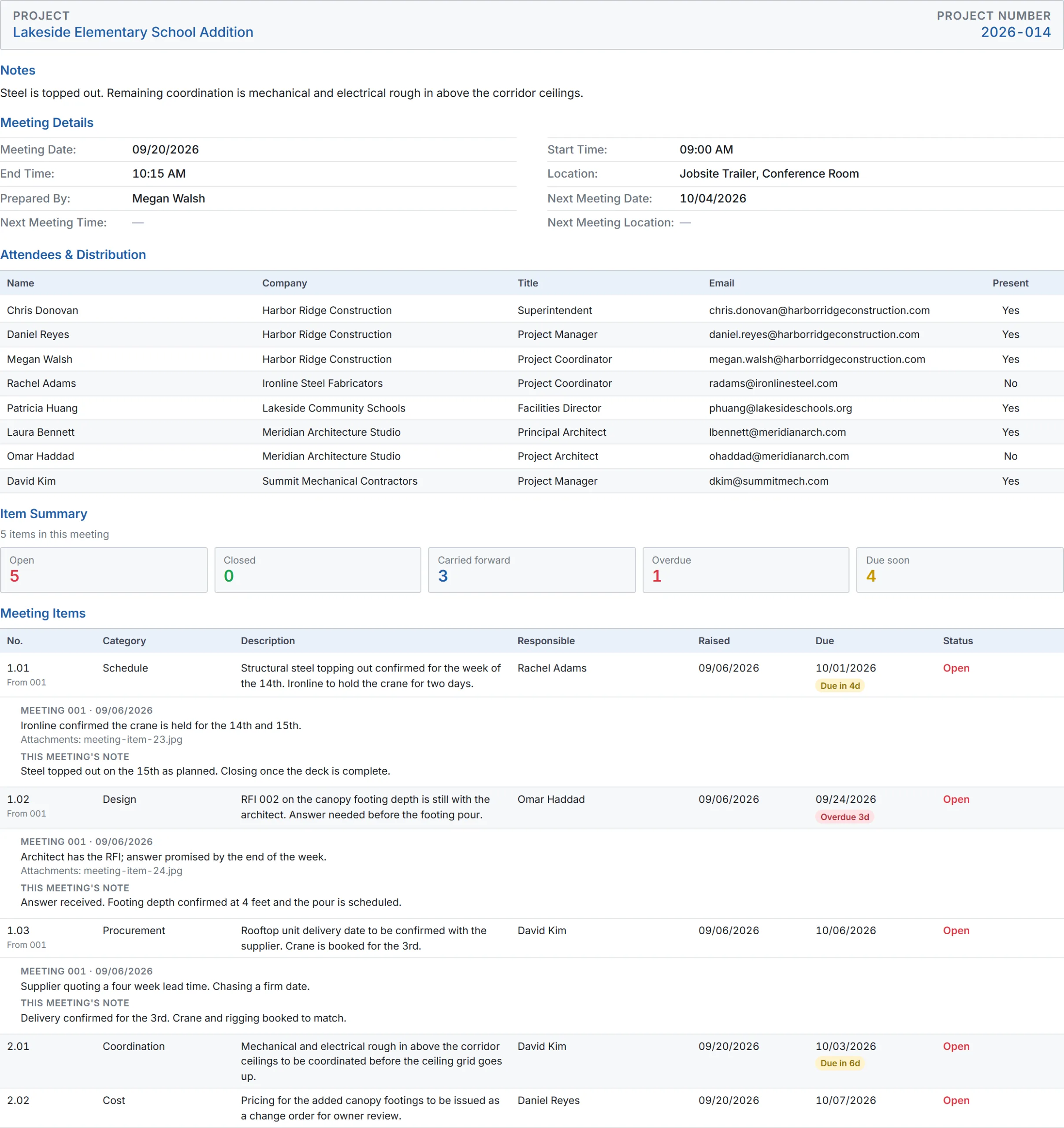
Then list the attendees, with their company, title and email, and mark who was present. The same list is usually the distribution list, so everyone who attended or needs to act on an item receives the minutes.
The main part of the minutes is the list of items. Give each item its own row, with these columns:
| No. | Category | Description | Responsible | Raised | Due | Status |
|---|---|---|---|---|---|---|
| 1.01 | Schedule | Structural steel topping out confirmed for the week of the 14th. | Steel subcontractor | 09/06 | 10/01 | Open |
| 1.02 | Design | RFI 002 on the canopy footing depth is still with the architect. | Architect | 09/06 | 09/24 | Open |
| 1.03 | Safety | Updated certificate of insurance received from the framing subcontractor. | Project coordinator | 09/06 | 09/13 | Closed |
A category, such as Schedule, Design, Procurement, Safety or Cost, makes it easier to find related items and to go through them in order at the meeting. Under each item, add a short note of what was said at this meeting, so the history of the item stays with it.
Here is a sample of finished minutes from Cloud PM, with the meeting details, the attendees and every item with its notes:
How to Track Open Items From One Meeting to the Next
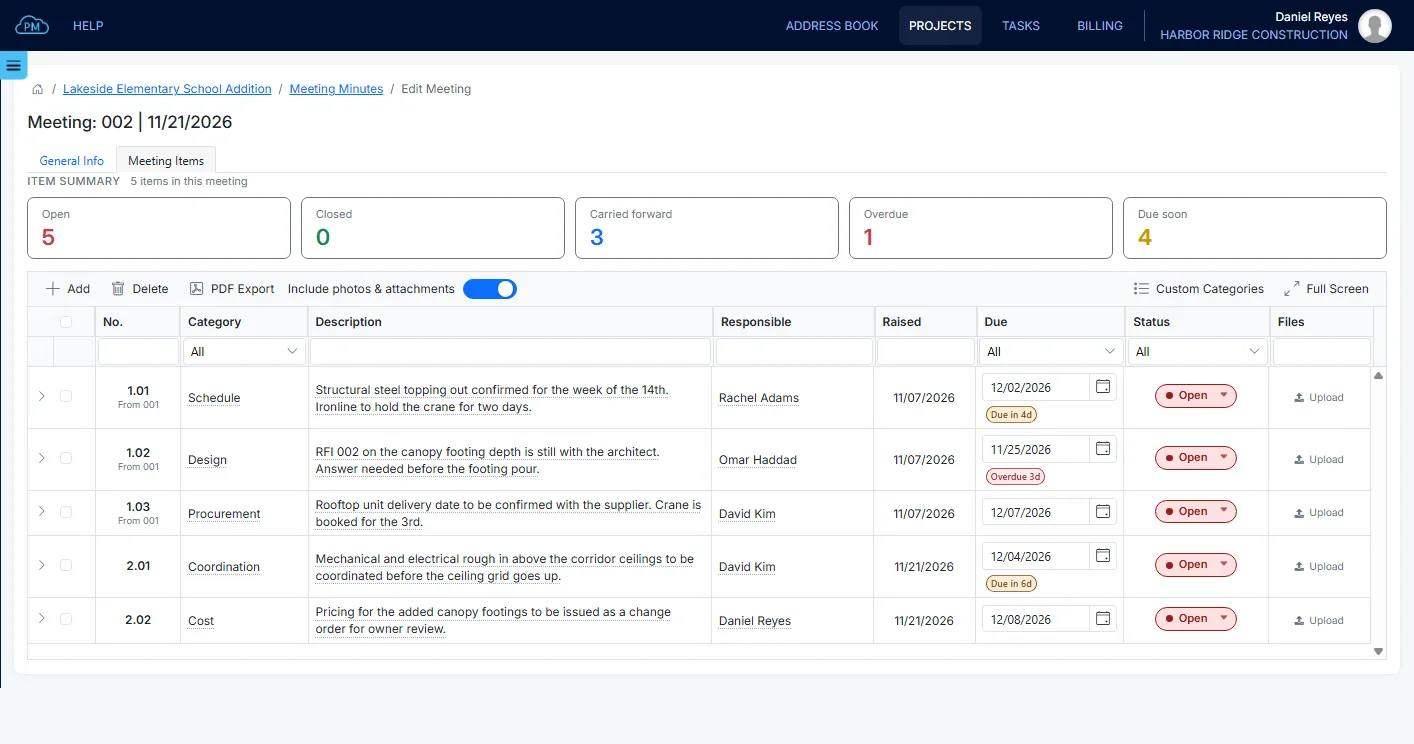
Most items take more than one meeting to resolve. An answer from the architect, a delivery date from a supplier or a price for a change can take weeks. The easiest way to keep track of them is to number the items by meeting: item 1.03 is the third item raised at meeting 1, and item 2.01 is the first item raised at meeting 2.
At the next meeting, list every open item again under its original number, then add the new items. Everyone can see where an item came from and how long it has been open, and nothing is dropped from the list until somebody closes it. Closed items stay in the minutes of the meeting where they were closed.
Items that need a formal answer or approval, such as a design question or a price for added work, should also be tracked as an RFI, a submittal or a change order. The minutes record that the question was raised, and the RFI or change order records the answer.
Tips for Writing Construction Meeting Minutes
- Send them the same day. Minutes sent a week later are harder to correct and easier to ignore. Send them while the meeting is still fresh.
- Give every item an owner and a due date. An item without a responsible person usually stays open until the next meeting.
- Record decisions, not conversations. Write what was decided and what happens next, not who said what.
- Use names, not “the contractor”. Name the person and the company responsible, so there is no doubt who has to act.
- Ask for corrections. Ask the attendees to send any corrections before the next meeting. If nobody objects, the minutes stand as the record.
- Keep them with the project. Save the minutes with the rest of the project records, next to your daily reports and punch lists, so you can find them years later.
Construction Meeting Minutes in Cloud PM
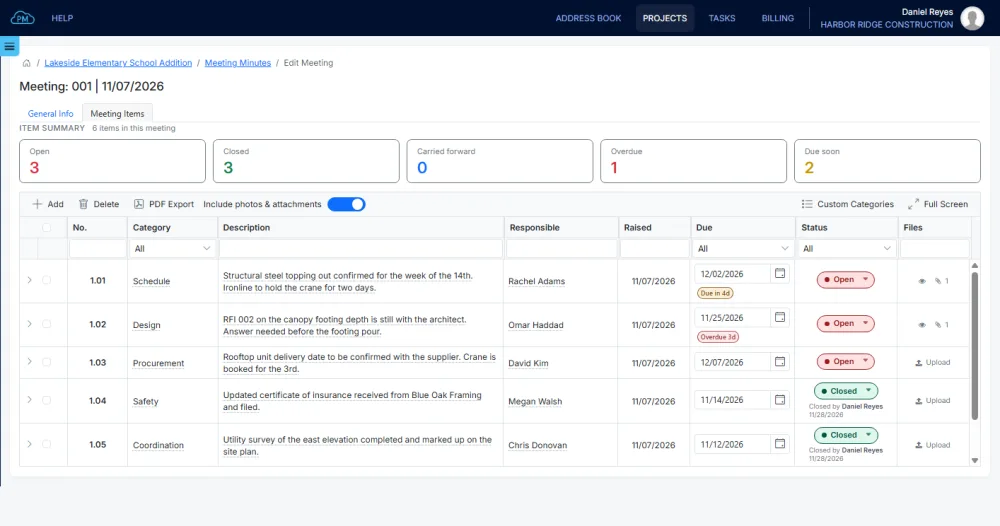
With Cloud PM, you can record every project meeting along with the date, time and location, the attendees and the distribution list. You can select the attendees from your own users and from the contacts of the other companies on the project, mark who was present and choose who receives the minutes.
Each item has a category, the responsible person and a due date, and its number starts with the number of the meeting where it was raised. Cloud PM includes ten standard categories, such as Progress, Coordination, Schedule and Safety, and any category you add is available on every project of your company. You can also see how many items in each meeting are open, overdue or due soon.
When you create the next meeting, Cloud PM copies the attendees, the location and every open item from the last meeting, so each new meeting starts with the items that still need attention. When the meeting is over, Cloud PM prepares the minutes as a PDF, with the photos and attachments of each item if you want them, and you can email the minutes to everyone on the distribution list.
The other companies on the project use Cloud PM free of charge, and plans start from $40 a month. Learn more about Cloud PM construction meeting minutes.
Frequently Asked Questions
How soon should meeting minutes be sent after a construction meeting?
As soon as possible, ideally on the day of the meeting and no later than a day or two after it. The sooner the attendees receive them, the sooner they can start on their items and send any corrections.
Are construction meeting minutes legally binding?
Meeting minutes are not a contract, and they don’t change the contract on their own. A change to the scope, price or schedule still needs a change order. But the minutes are a record of what was discussed and agreed, and if nobody corrected them, they can be used as evidence in a dispute.
What is the difference between a meeting agenda and meeting minutes?
The agenda is sent before the meeting and lists the topics to discuss. The minutes are sent after the meeting and record what was discussed and decided and who is responsible for each item. On most projects, the open items of the last minutes become the agenda of the next meeting.
How long should you keep construction meeting minutes?
Keep them with the project records for as long as you keep the rest of the project documents, usually several years after completion. Contracts, warranties and the time limits for claims in your state decide the exact period.