
A punch list is a list of the work that still has to be fixed or finished before the owner accepts a construction project. Each punch list item says what is wrong, where it is and which company has to fix it. The project isn’t complete until every item on the list is closed.
In this post we explain when a punch list is created, what each item should include and how to take a punch list from the walk-through to the last closed item. Then we show how punch lists work in Cloud PM.
What Is a Punch List in Construction?
A punch list is made near the end of construction, when the building is close to finished. The general contractor, the architect and the owner walk through the project and write down everything that doesn’t match the contract documents: a scratched door, a missing cover plate, a light that doesn’t work.
The punch list matters because money depends on it. Many contracts hold back part of every payment as retainage and release it only when the punch list is done and the closeout documents are handed over. A short punch list that gets closed quickly means the contractor and the subcontractors are paid sooner.
When Is a Punch List Created?
Most projects go through more than one round of punch lists:
- The pre-punch list. The general contractor and the subcontractors walk the job first and fix what they find, so the official list is shorter.
- The punch list at substantial completion. The architect or the owner walks the project when it can be used for its purpose, and lists everything that is still open.
- The final walk-through. The architect or the owner checks that every item is fixed before final completion and final payment.
On larger projects, each area gets its own walk-through and its own list, such as one floor, one wing or the exterior, so every list stays short enough to follow.
What to Include in a Punch List
Every item on the list should answer what has to be done, where, by whom and by when:
- Number: so everyone can refer to the item the same way.
- Location: the room, the floor or the area, as precise as possible.
- Description: what is wrong and what has to be done, in a sentence anyone on site can understand.
- Spec section: the section of the specifications the work belongs to, which also points to the trade responsible for it.
- Responsible company: the subcontractor that has to fix it.
- Due date: when it has to be done.
- Photo: a picture taken during the walk-through shows the problem better than any description.
- Status: whether the item is open, waiting for a check or closed.
The list itself needs a title or area, the date of the walk-through and the companies it was sent to, so there is a record of who knew about each item and when.
How to Close Out a Punch List
- Walk the project one area at a time. Record each item where you find it, with its location and a photo.
- Assign every item to one company. An item with two possible owners tends to wait for both of them.
- Give every item a due date and send the list to the companies on it.
- Let the subcontractor report the item as ready when the work is done.
- Check the work before you close the item. Close it only after someone has seen that it is fixed, and record who accepted it and when.
- Follow up on the overdue items every week until nothing is left open.
Common Punch List Items
Most punch list items are small, but there are many of them. These come up on almost every building project:
- Paint touch-ups and scuffs on walls and doors
- Damaged door frames, doors that don’t close or latch, and missing door hardware
- Missing outlet and switch cover plates
- Stained or broken ceiling tiles
- Missing caulking around fixtures, counters and windows
- Light fixtures, outlets or plumbing fixtures that don’t work
- Cleaning: dust, labels and protective film left on finishes
A Punch List Example
A general contractor finishing the second floor of an office building keeps this punch list after the walk-through with the architect. The dates are an example:
| No. | Location | Description | Assignee | Due | Status |
|---|---|---|---|---|---|
| 1 | Room 204 | Door frame damaged at the latch side, repair and repaint | Door and frame subcontractor | 03/12/2027 | Closed |
| 2 | Room 207 | Two stained ceiling tiles above the window, replace | Ceiling subcontractor | 03/12/2027 | Ready for Review |
| 3 | Corridor 2B | Cover plate missing on the outlet by the fire extinguisher | Electrical subcontractor | 03/10/2027 | Open (overdue) |
| 4 | Restroom 210 | Caulk the joint between the counter and the wall | Plumbing subcontractor | 03/15/2027 | Open |
Item 1 is fixed and checked. Item 2 is fixed but waits for someone to check it before it is closed. Item 3 is overdue, so the electrical subcontractor gets a call first.
Managing Punch Lists in Cloud PM
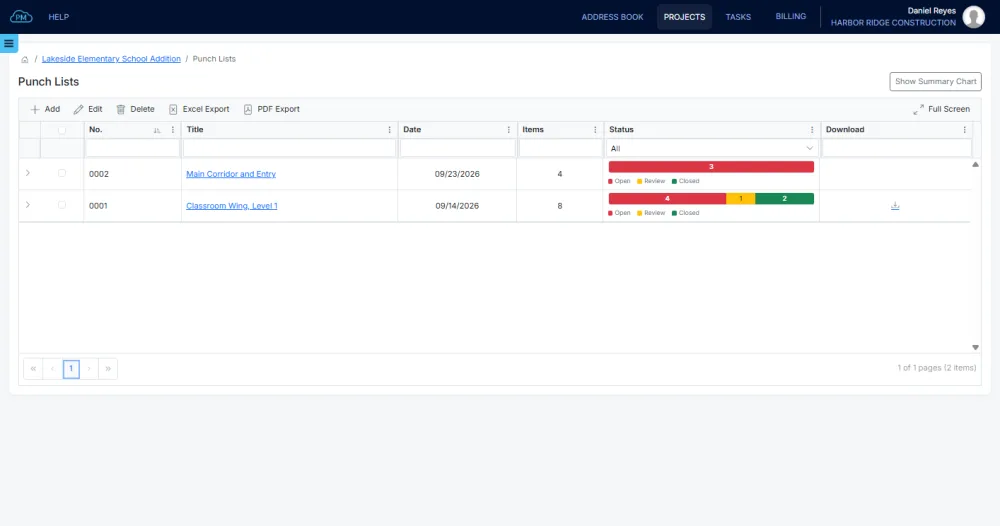
In Cloud PM, each walk-through is its own punch list, kept on the Punch Lists page of the project. For each list you can see the date, the number of items and a status bar that shows how many items are open, under review and closed.
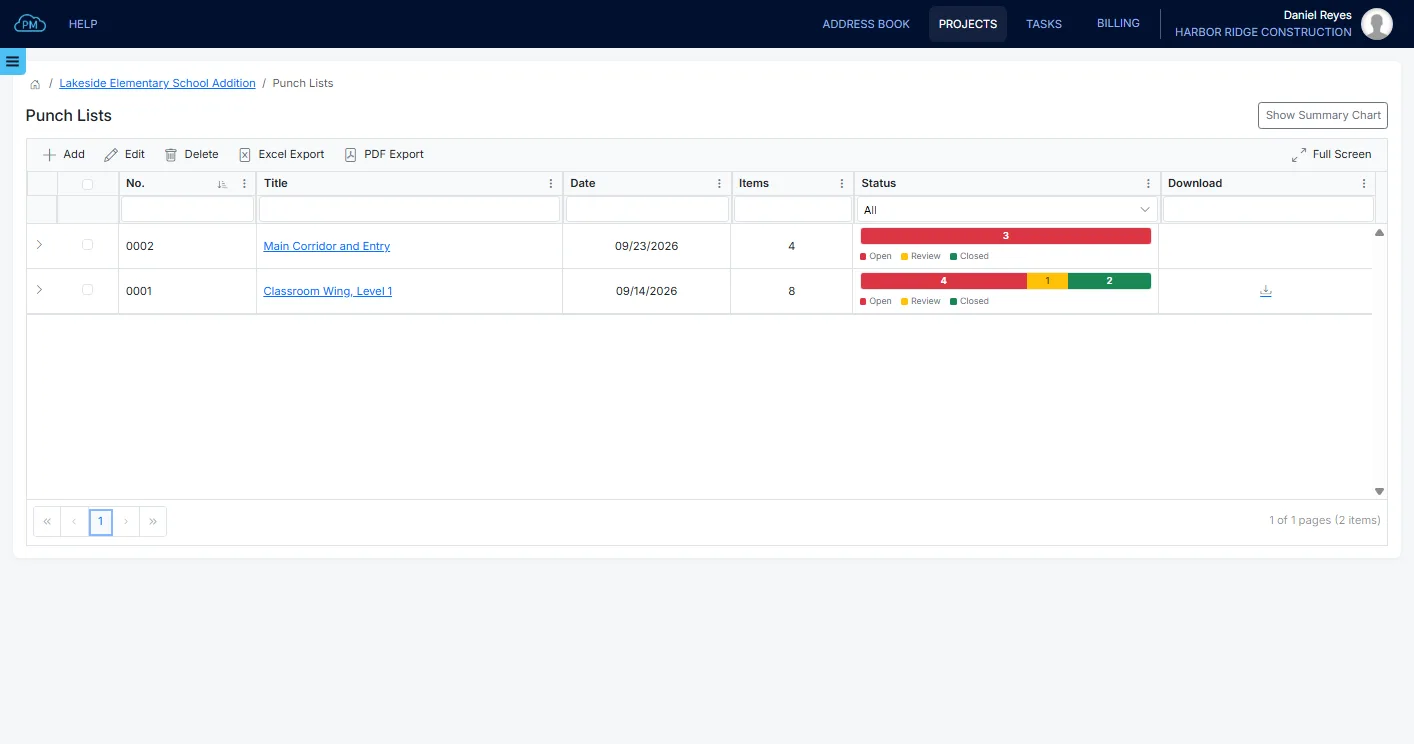
For each item you enter the location, the spec section, a description and the assignee, which can be a company from the Project Directory or one of its contacts. A new item starts as Draft, and when you set its due date it becomes Open. Once the due date has passed, Cloud PM marks the item as overdue.
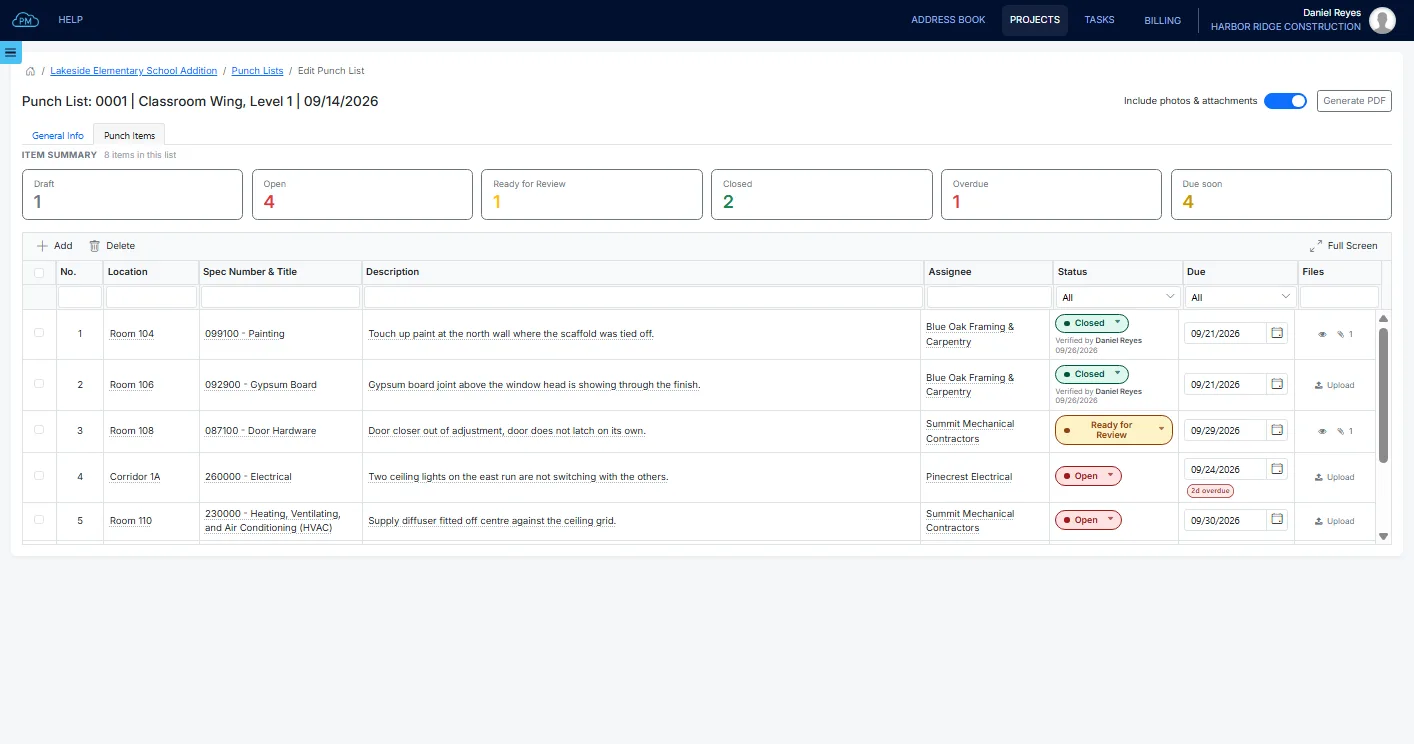
You can add photos and documents to each item, such as a photo of the damaged door frame, so the subcontractor sees exactly what has to be fixed.
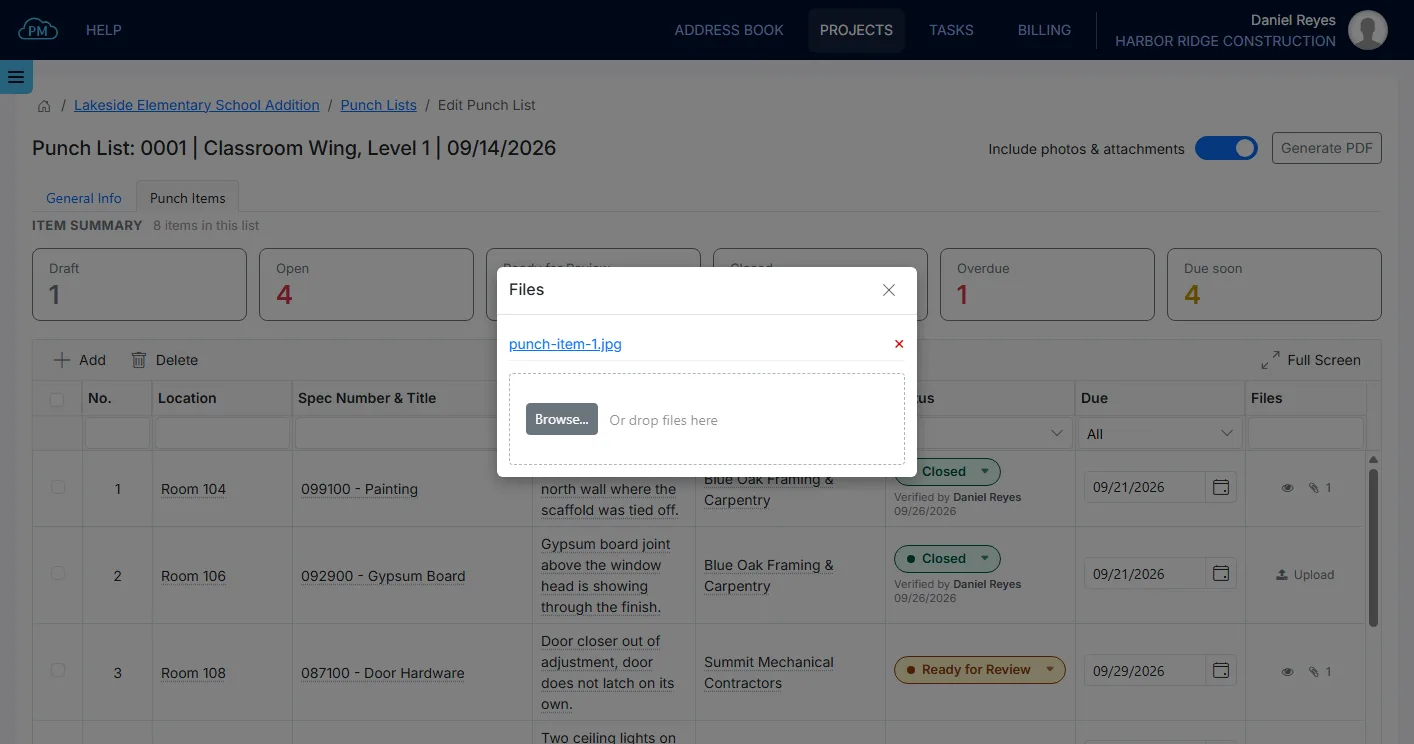
When the list is ready, Cloud PM prepares it as a PDF with your notes and every item with its status and due date, and the photos and attachments if you include them. You can email it to the companies and contacts in the Project Directory, and Cloud PM shows who received it and when.
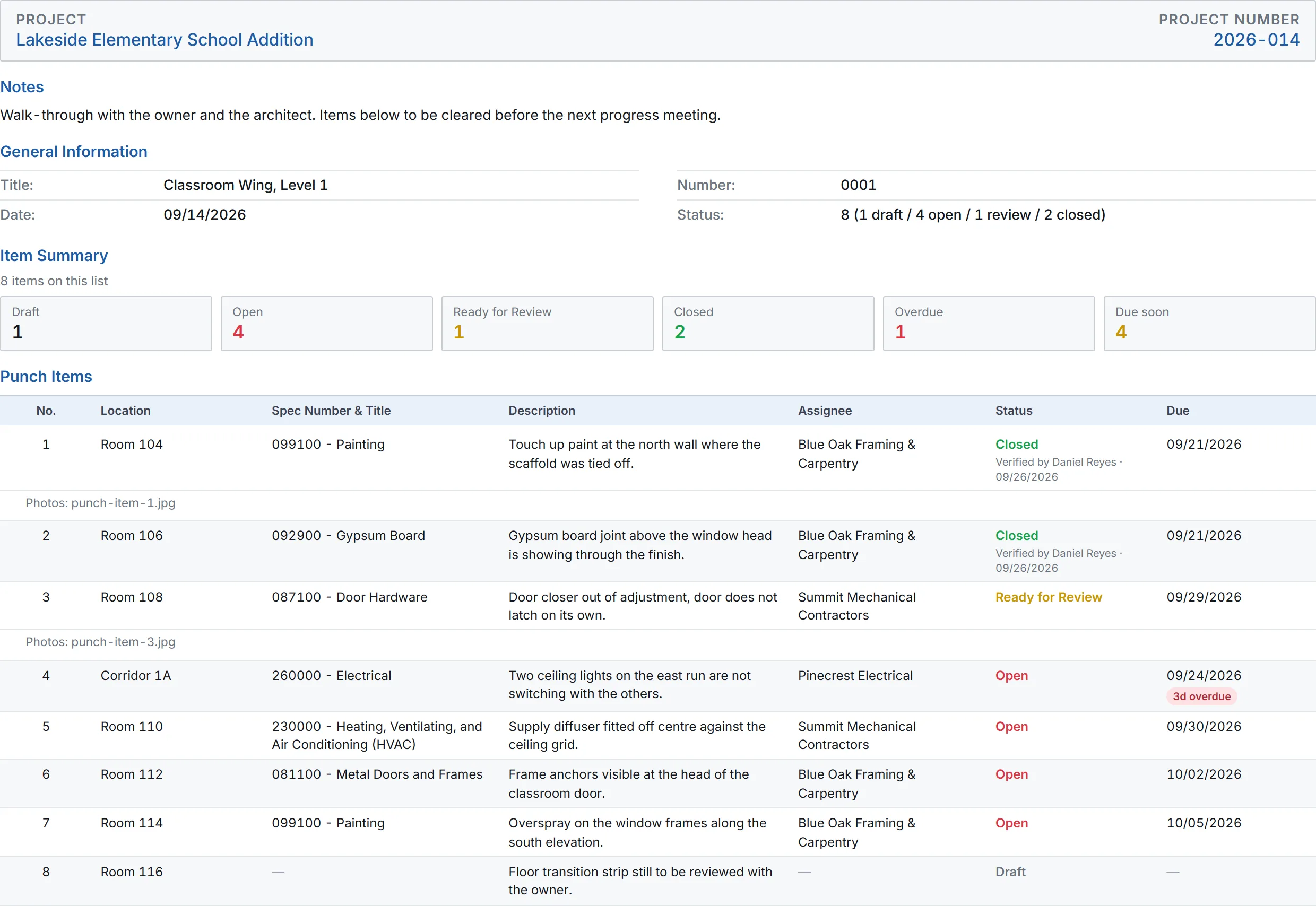
When the subcontractor finishes an item, it changes the item to Ready for Review. You close it once you have checked the work, and Cloud PM records who closed it and when. The other companies on the project use Cloud PM free of charge, and plans start from $40 a month. Learn more about the Cloud PM construction punch list.
Frequently Asked Questions
Who creates the punch list?
The architect or the owner usually creates the official punch list during the walk-through at substantial completion. The general contractor often makes its own pre-punch list first, and passes each item to the subcontractor responsible for it.
Can retainage be held until the punch list is finished?
Yes. Many contracts release part of the retainage at substantial completion and keep enough to cover the open punch list items, then release the rest when every item is closed.
What happens if a subcontractor doesn’t finish its punch list items?
The general contractor follows up and, if the work still isn’t done, can have another company finish it and charge the cost to the subcontractor, as the subcontract allows. That is why every item needs a responsible company and a due date.