
A procurement log is a list of every material and service a construction project has to buy, with the company supplying it, where the order stands and the date the job needs it. The general contractor uses it to see which deliveries are running late while there is still time to do something about it.
In this post we explain what goes into a procurement log, how an order moves from the purchase order to the job site, and how to keep the log up to date. Then we show how the Procurement Log in Cloud PM works.
What Is a Procurement Log in Construction?
A procurement log, also called an expediting report, tracks each item the project buys from the moment you decide to purchase it until it arrives and is checked on site. Each line is one material or service: the structural steel, the storefront glazing, the rooftop units, the elevator.
For each item, the log answers three questions: who is supplying it, where the order is now, and whether it will arrive before the job needs it. A material that arrives late can hold up the crews that depend on it, so the log is as much a scheduling tool as a purchasing one.
Why Keep a Procurement Log?
- Long-lead items. Switchgear, elevators, custom windows and structural steel can take months to make. If you track them from the start, you know early whether they will be ready.
- Submittals come first. Many materials can’t be ordered until their submittal is approved. When the log shows whether each item needs a submittal and where that submittal stands, you can see which orders are waiting on the architect.
- One list for the whole team. The project manager, the superintendent and the people receiving deliveries on site all work from the same dates, instead of their own notes and emails.
- A record of what arrived. When a delivery is short or damaged, the log shows what was ordered, what came and what was sent back.
What to Include in a Procurement Log
A useful procurement log has these columns for every item:
- Material or service: what you are buying.
- Location: where on the job it goes, such as a floor, an area or a building.
- Supplier or subcontractor: the company responsible for it, or your own company when the work is self-performed.
- Spec section: the section of the project specifications that covers it, so you can match it to its submittal.
- Submittals needed: yes or no, and the status of the submittal when one is needed.
- Status: where the order stands (see the stages below).
- Purchase order number, quantity and units.
- Dates: when it was ordered, went into production and shipped.
- Expected delivery: the date the supplier gives you.
- Needed by: the date the job needs it on site.
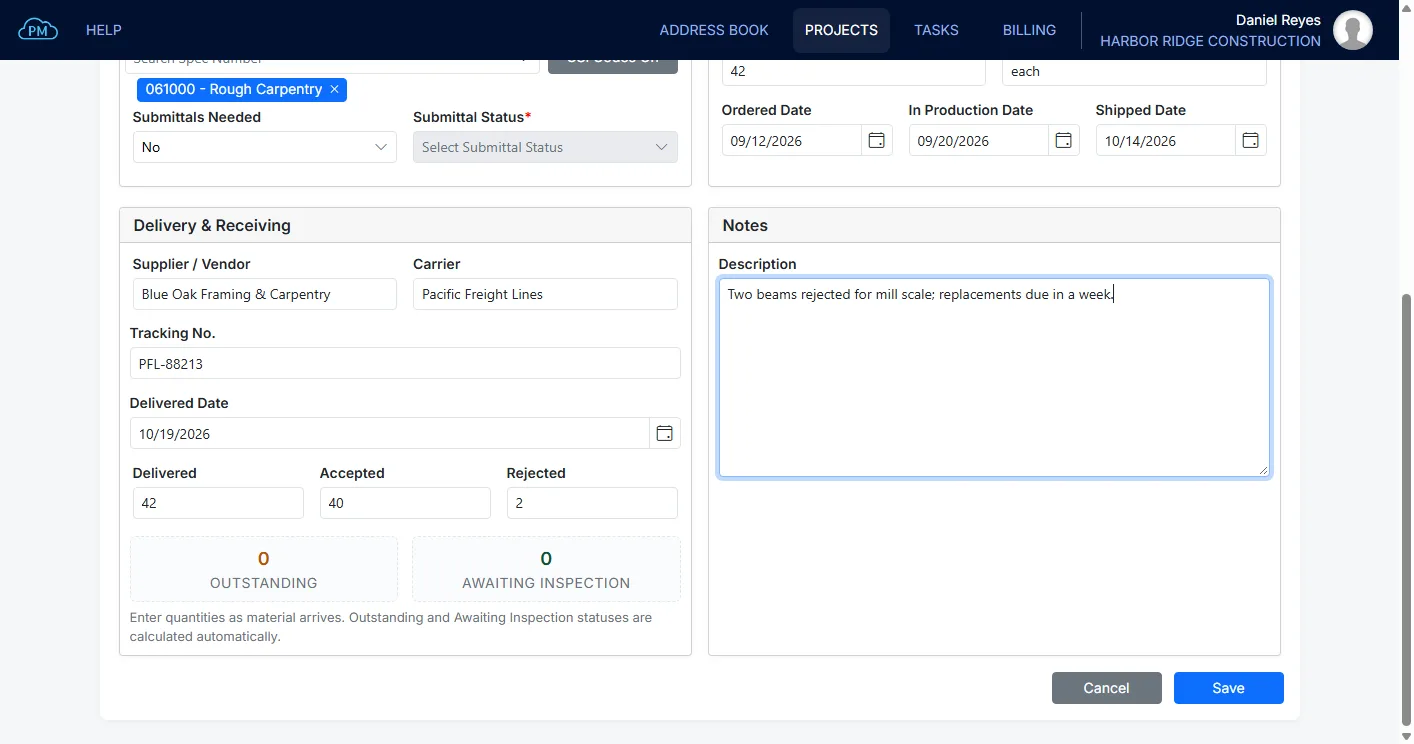
- Delivery details: the carrier, the tracking number and the delivered date.
- Quantities delivered, accepted and rejected.
- Notes: anything else the team should know.
The two dates that matter most are the expected delivery and the needed by date. When the expected delivery comes after the needed by date, the item will be late unless someone acts.
The Stages of an Order
Each item moves through three stages, and the status tells the team which one it is in:
- Procurement and ordering. The item isn’t bought yet, it is bought, or it is ordered from the supplier.
- Production and shipping. The supplier is making it, it is delayed, or it has shipped.
- Receiving and inspection. It arrived in part or in full, was checked and accepted, was rejected in part or in full, or was returned.
Keep rejected and partly delivered items open until the rest arrives, so nothing drops off the list before it is actually on site.
How to Keep a Procurement Log Up to Date
- Add an item as soon as you decide to buy it, not when it ships. The earlier it is on the log, the earlier you see a problem.
- Set the needed by date from the schedule. It is the date the crew installing the material needs it, so take it from the project schedule rather than from the supplier.
- Update the status when the supplier reports progress, with the date of each step. This is what expediting means: following up with suppliers so orders arrive on time.
- Check the late and almost late items every week. Sort or filter the log by the days left before the needed by date, and call the suppliers of anything overdue or close to it.
- Record every delivery when it arrives, with the quantities accepted and rejected, so the log always shows what is actually on site.
A Procurement Log Example
A general contractor building a three-story office building keeps this procurement log. The dates are an example:
| Material/Service | Supplier | Status | Expected Delivery | Needed By |
|---|---|---|---|---|
| Structural steel | Steel fabricator | In Production | 02/08/2027 | 02/15/2027 |
| Storefront glazing | Glazing subcontractor | Ordered | 04/19/2027 | 04/12/2027 |
| Rooftop units | Mechanical subcontractor | Delayed | 05/03/2027 | 05/10/2027 |
| Concrete | Self-performed | Delivered | 01/11/2027 | 01/11/2027 |
The steel is on time. The glazing will arrive a week after the job needs it, so the project manager calls the glazing subcontractor now, while there is still time to move the date or change the sequence of work. The rooftop units are delayed but still a week ahead of the needed by date, so they stay on the weekly check.
Keeping a Procurement Log in Cloud PM
In Cloud PM, the Procurement Log is part of each project, next to the submittals and the project files, so your team doesn’t need a separate spreadsheet for orders.
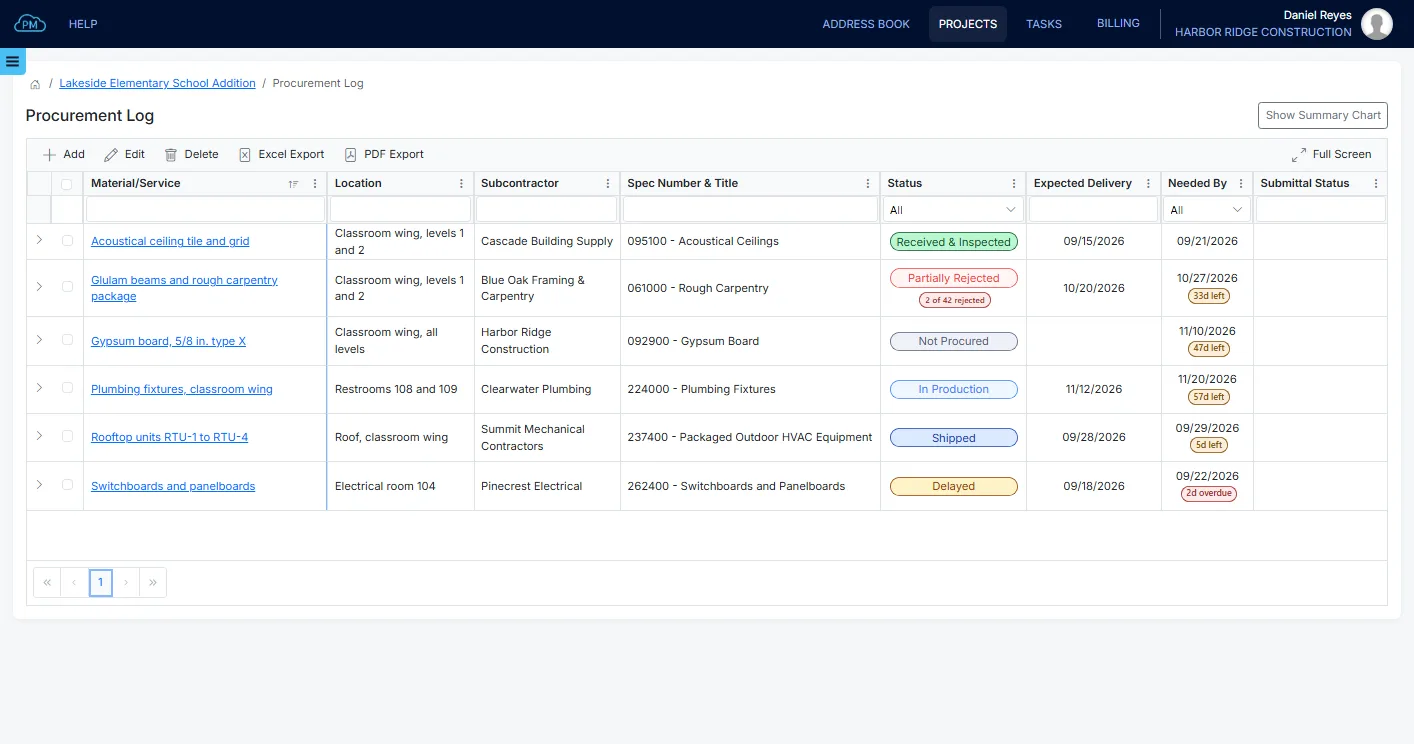
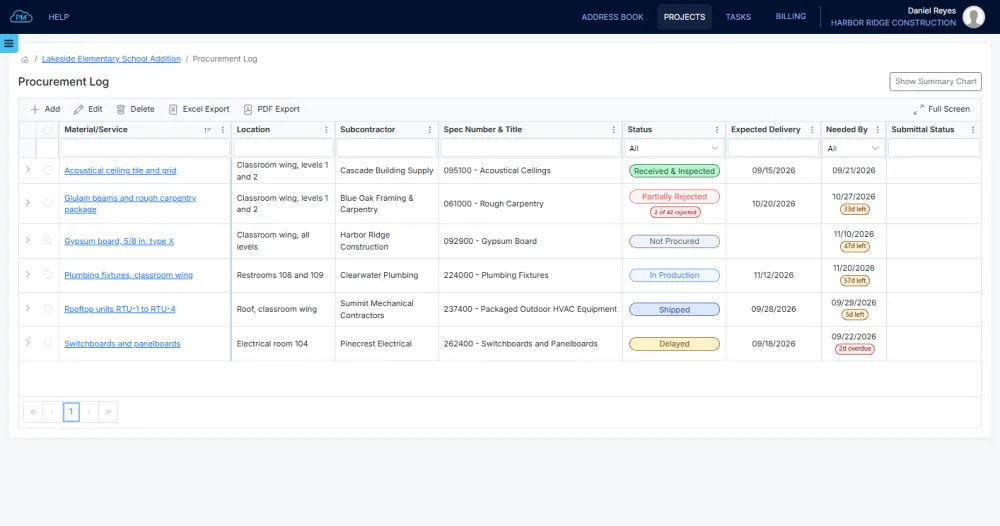
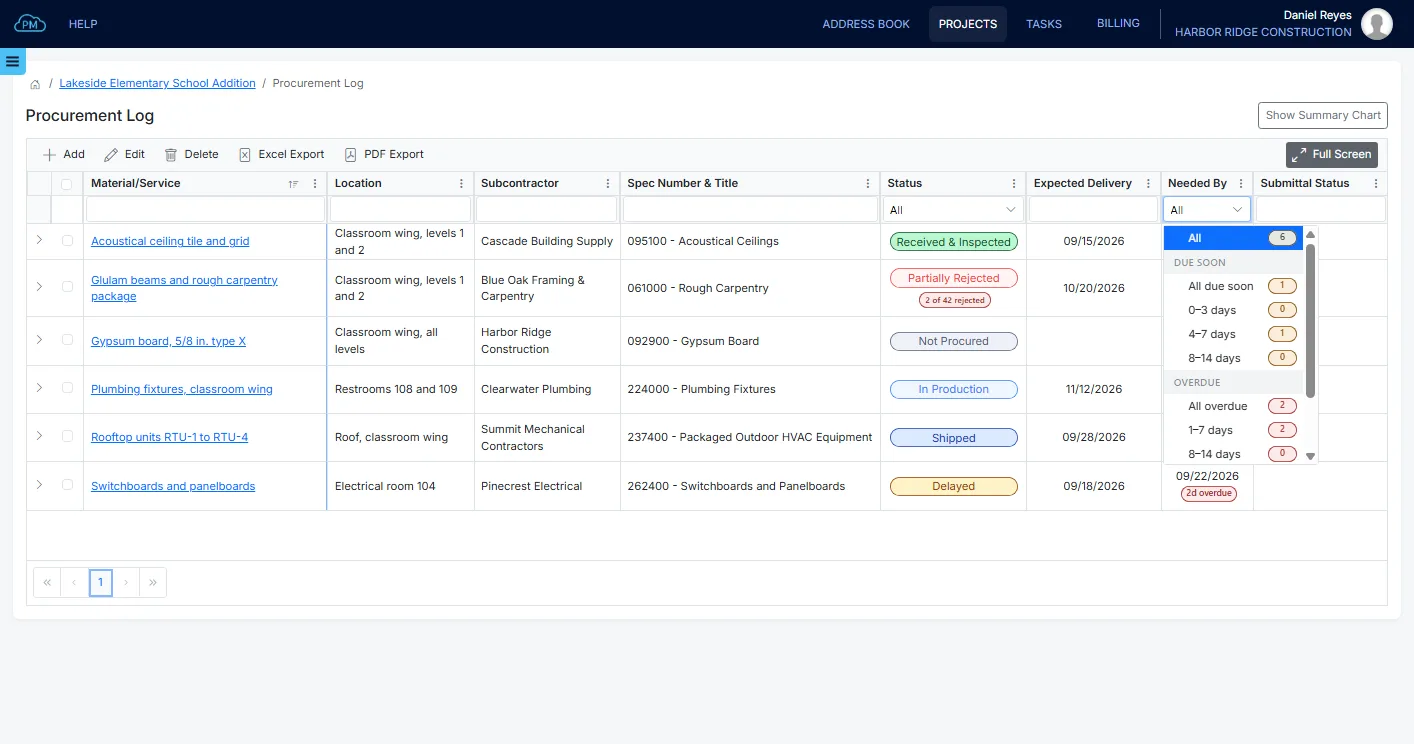
Each item has its location, the subcontractor responsible or Self-performed, the spec section and whether submittals are needed. When they are, the log shows the submittal status too. The log shows the days left before each needed by date. You can filter it by status, and the Needed By filter groups the items that are overdue or due soon.
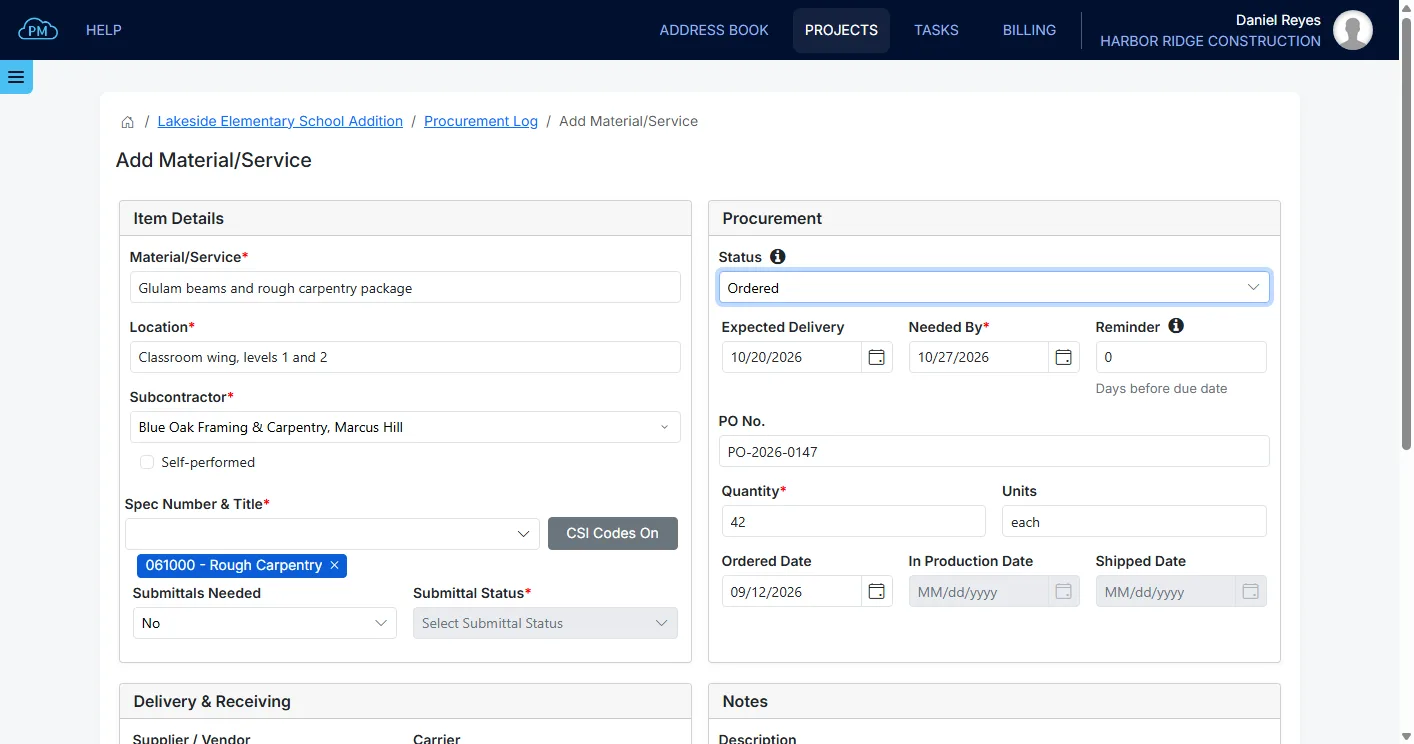
When you add an item, you enter the material or service, the subcontractor, the dates and the quantity. You can set a reminder a number of days before the needed by date, which gives you time to follow up before a late delivery affects the schedule.
As the supplier reports progress, you update the status from Ordered to In Production and Shipped, and add the carrier and the tracking number. When the material arrives, you enter the quantities delivered, accepted and rejected, and Cloud PM sets the receiving status from them, so a partial delivery or a rejected part shows on the log right away.
You can export the log to Excel or PDF. When you give subcontractors and suppliers access to the project, they can see the Procurement Log too, and they use Cloud PM free of charge. Plans start from $40 a month. Learn more about the Cloud PM procurement log.
Frequently Asked Questions
What is the difference between a procurement log and a procurement schedule?
A procurement schedule plans when each item has to be ordered so it arrives on time, working back from the date it is needed. A procurement log tracks the orders once they are placed, until the material is on site. Many contractors keep both in one list.
What is a long-lead item in construction?
A long-lead item is a material or piece of equipment that takes a long time to make or deliver, such as switchgear, elevators, structural steel or custom windows. Long-lead items are ordered early and watched closely on the procurement log.
What does expediting mean in construction?
Expediting is following up with suppliers and subcontractors so orders are made, shipped and delivered on time. The procurement log is the list the expediter works from.
Who keeps the procurement log?
Usually the general contractor’s project manager or project engineer, with the superintendent recording deliveries on site.