
Integration with QuickBooks Online
Cloud PM's integration with QuickBooks Online helps you manage your construction projects and your accounting without entering the same data twice. You can prepare your AIA G702 and G703 in Cloud PM, and when a payment application is approved, export it to an invoice that syncs with QuickBooks Online.
How Cloud PM Works With QuickBooks Online
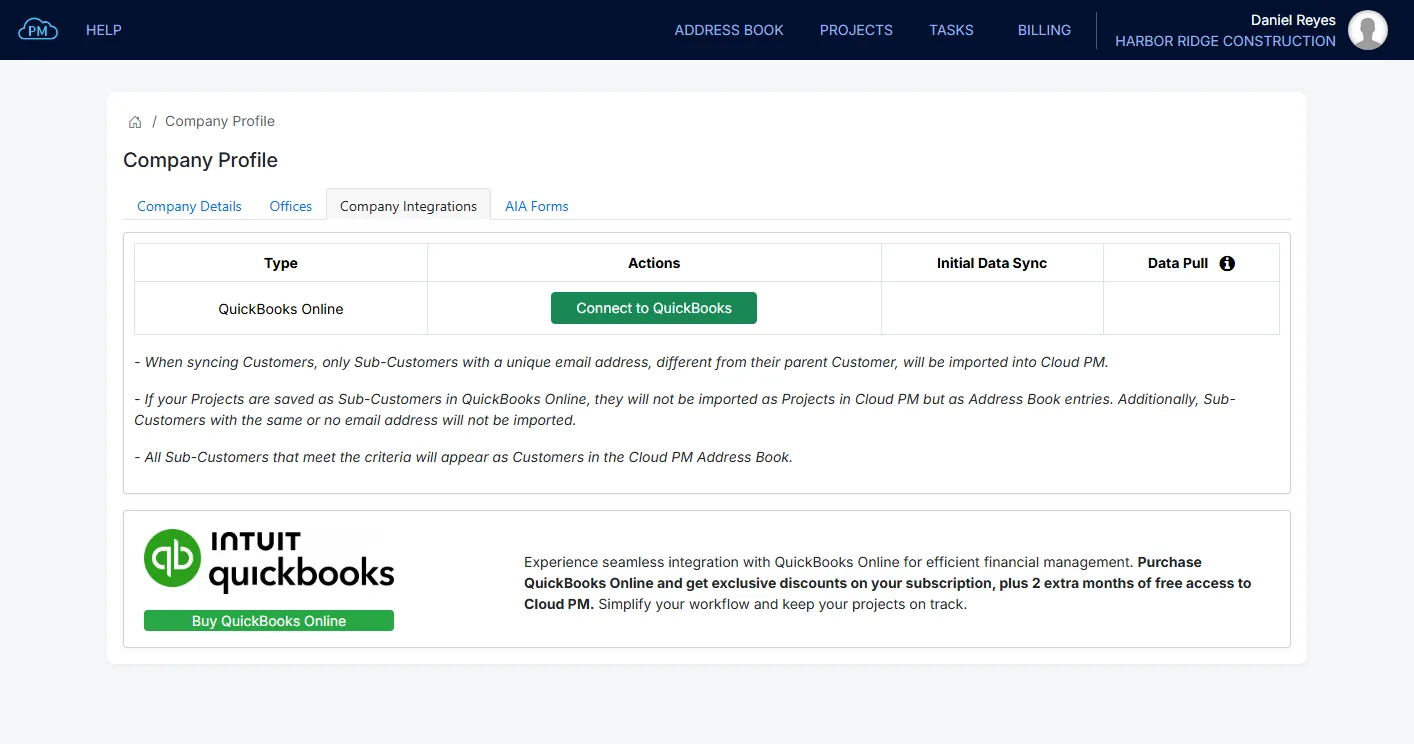
You can connect QuickBooks Online from your Company Profile, and most of your records then sync both ways, so your customers, vendors, accounts and invoices are always the same in both systems. Cloud PM works with a QuickBooks preferred partner.
-
Two-Way Sync
Most records sync both ways, and you can see the few that sync in one direction.
-
AIA Forms on the Invoice
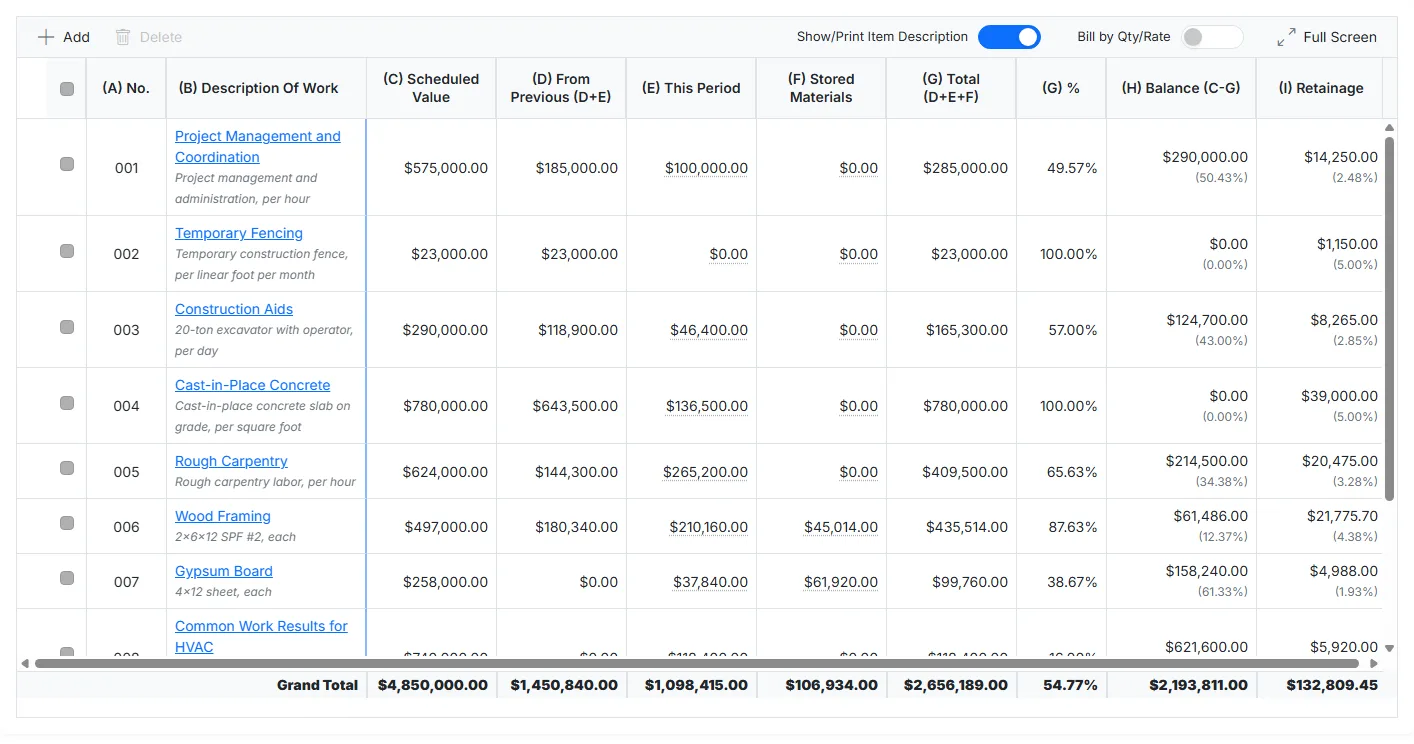
When you export an approved payment application to an invoice, Cloud PM attaches the G702 and G703 automatically.
-
Shared Customers and Vendors
Your customers and vendors sync with QuickBooks Online, so the companies on your projects are the same in both systems.
Chart of Accounts
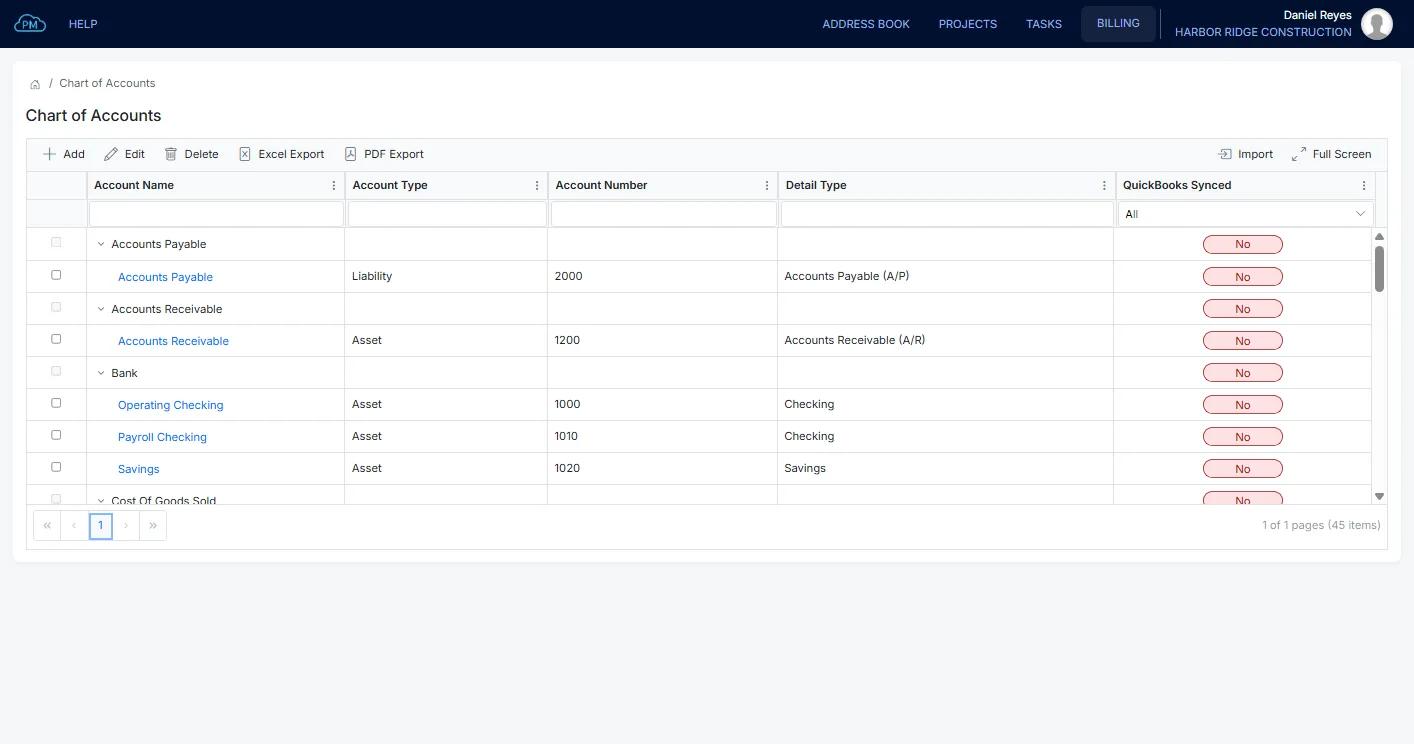
Your chart of accounts syncs both ways, and you can see which ones have synced or not. When you add or change an account in either system, it is updated in the other one, so the two charts always match.
Products, Services and Bundles
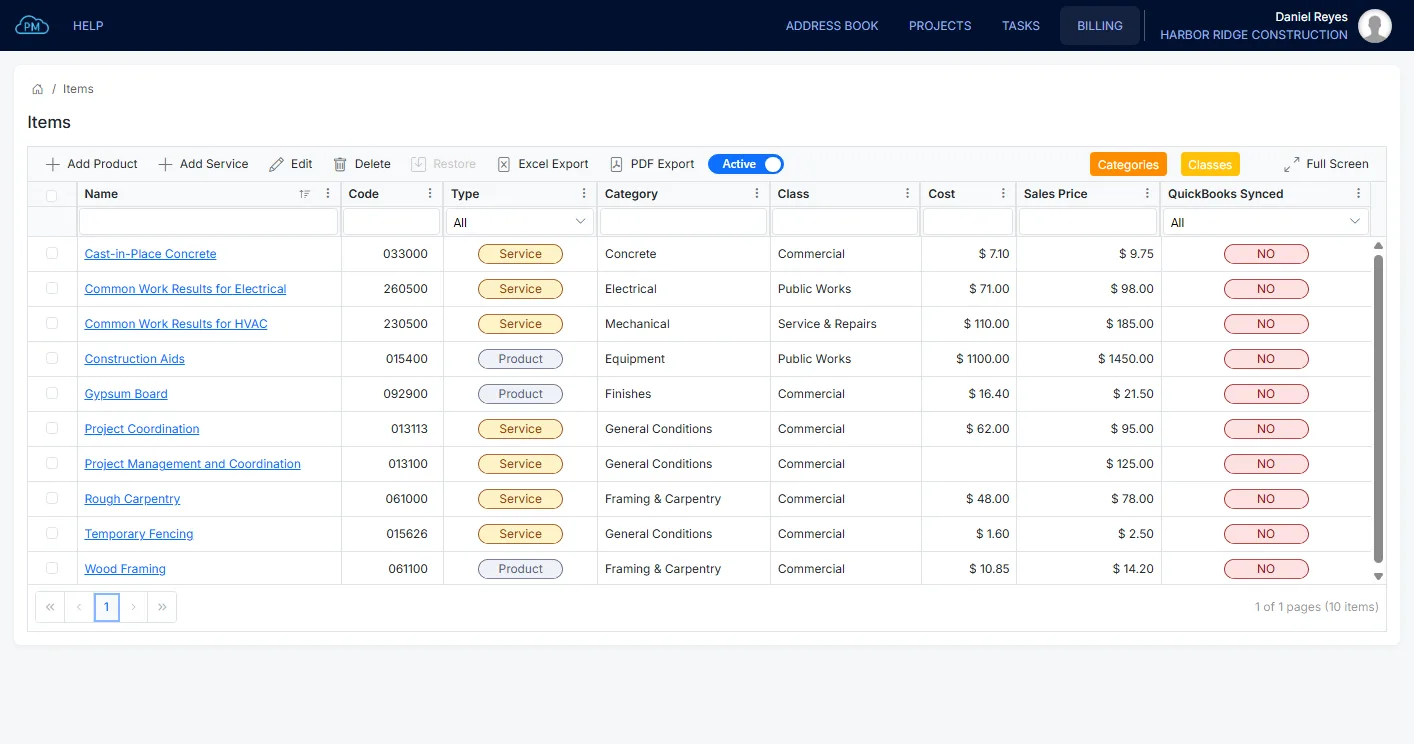
Your products and services sync with QuickBooks Online, along with their categories and classes. Non-inventory products and services sync both ways, while inventory items and bundles sync from QuickBooks Online only, because you manage them there.
Invoices and Payments
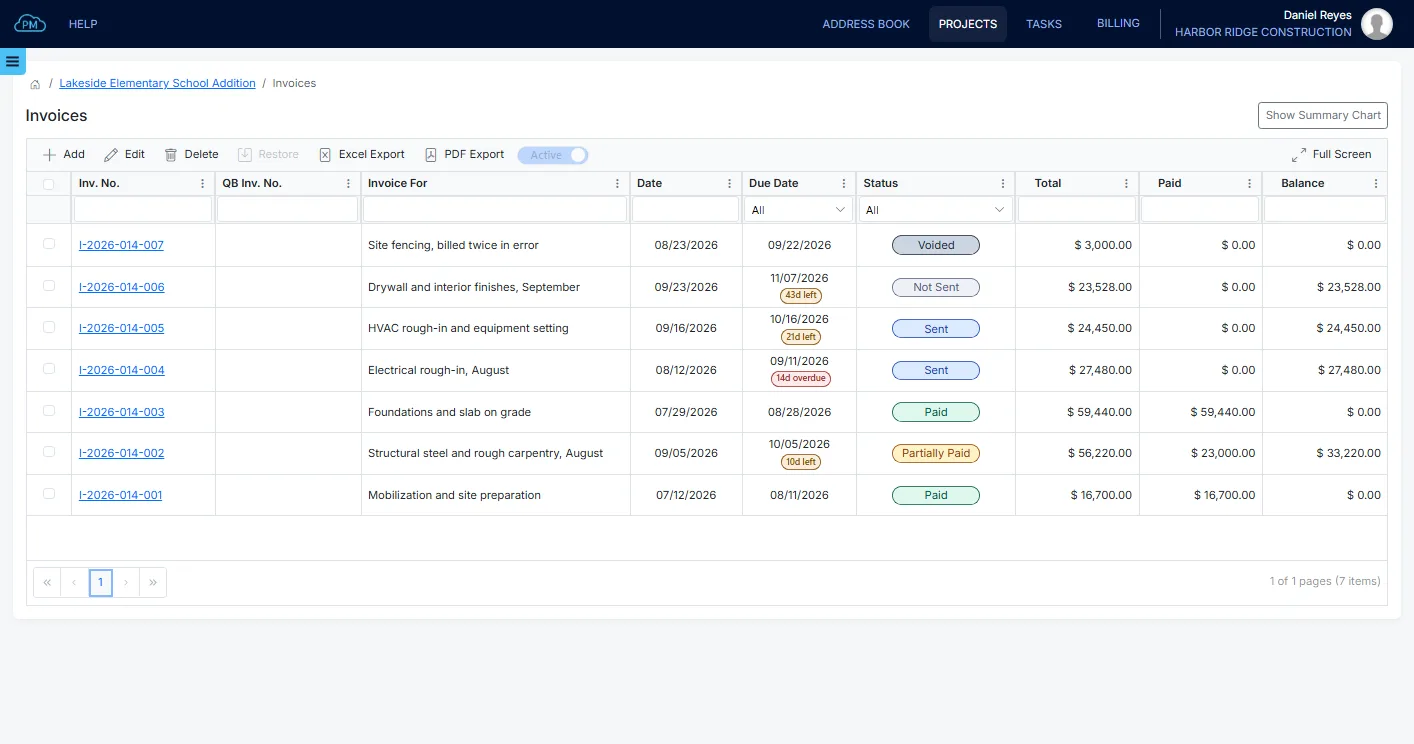
Your project invoices sync with QuickBooks Online, and you can see the QuickBooks number of each one. Payments sync both ways, while the payment terms and tax rates come from QuickBooks Online.
What Syncs, and Which Way
This table shows the records Cloud PM and QuickBooks Online share and the direction of each sync.
| Feature | From Cloud PM to QuickBooks | From QuickBooks to Cloud PM |
|---|---|---|
| Project Syncing (QuickBooks Online Plus, Advanced and Accountant) | ✔ | ✔ |
| Invoices | ✔ | ✔ |
| Invoice Terms | – | ✔ |
| Tax rates | – | ✔ |
| Export Schedule of Values AIA G703 to an Invoice | ✔ | N/A |
| Attach AIA G702 & AIA G703 to an Invoice | ✔ | N/A |
| Expenses | ✔ | ✔ |
| Payment Accounts | – | ✔ |
| Payment Methods | – | ✔ |
| Chart of Accounts | ✔ | ✔ |
| Products (Non-inventory) | ✔ | ✔ |
| Services | ✔ | ✔ |
| Inventory | – | ✔ |
| Bundles | – | ✔ |
| Categories | ✔ | ✔ |
| Classes | ✔ | ✔ |
| CSI MasterFormat Numbers & Titles (at Products, Services, Categories, Classes) | ✔ | N/A |
| Employees (Payroll not enabled) | ✔ | ✔ |
| Employees (Payroll enabled) | – | ✔ |
| Customers | ✔ | ✔ |
| Vendors | ✔ | ✔ |
AIA Billing with QuickBooks Online
With Cloud PM, you can bill on AIA forms and keep your accounting in QuickBooks Online. You can prepare the billing on the AIA G703 schedule of values, and when the payment application is approved, you can export it to an invoice with the G702 and G703 attached. The owner receives the AIA forms, while QuickBooks Online records a regular invoice.
Bills, Expenses, Customers and Vendors
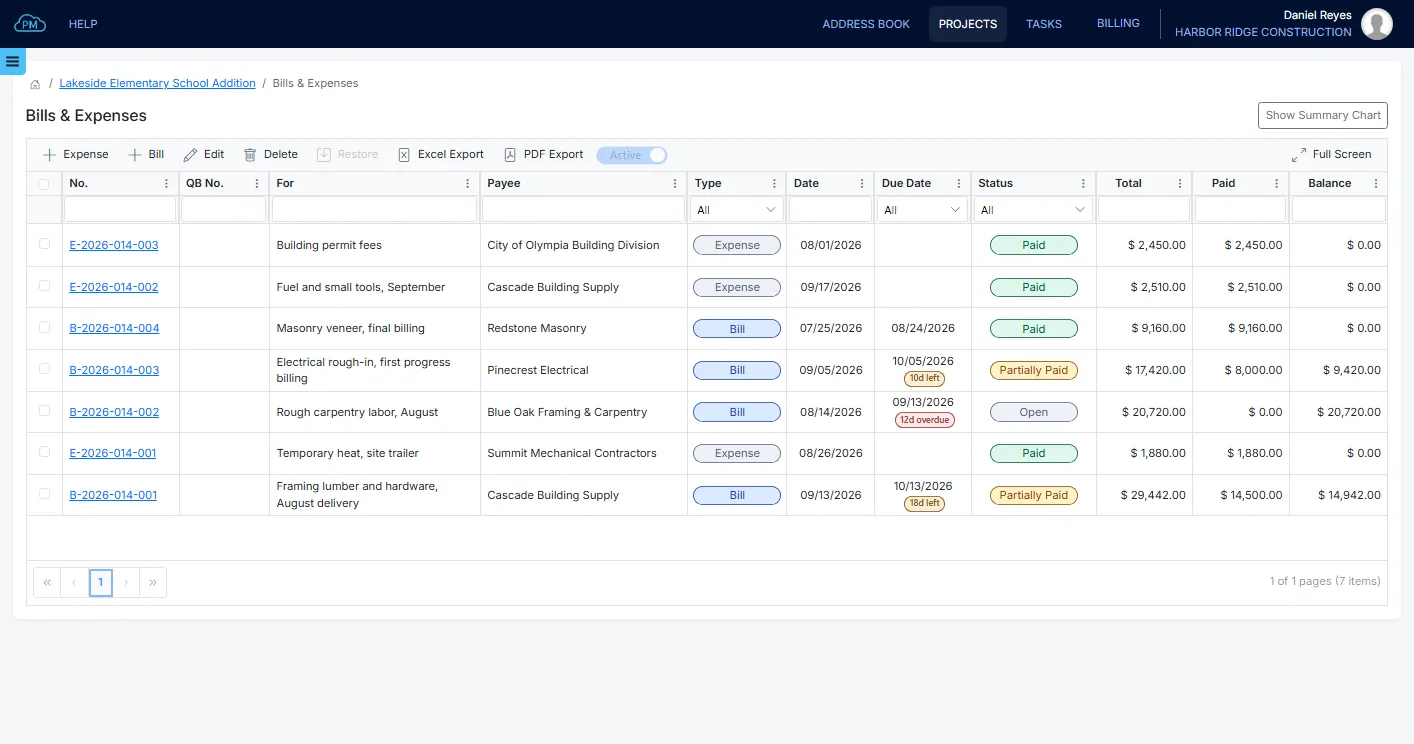
Bills and expenses and their payments sync both ways, while the payment accounts and payment methods come from QuickBooks Online. Customers and vendors also sync both ways. Employees sync both ways when payroll is not enabled in QuickBooks Online, and from QuickBooks Online only when it is.
Why Choose Cloud PM Alongside QuickBooks Online
With Cloud PM, you can manage your projects in Cloud PM and keep your accounting in QuickBooks Online, without entering the same data twice. The QuickBooks Online integration is included in the Premium plan, from $120 a month, and if you are moving from another accounting system, our data migration partner can move your data.
-
Simple Connection
You can connect QuickBooks Online from your Company Profile, so no one has to export spreadsheets at the end of the month.
-
AIA Forms With Every Invoice
You can prepare the AIA billing in Cloud PM on the G702 and G703, and it goes to QuickBooks Online as an invoice with both forms attached.
-
QuickBooks Partner Offer
If you buy a QuickBooks Online subscription through our QuickBooks preferred partner, you get a discount and two extra months of Cloud PM.
QuickBooks Online Integration FAQ
Yes. You can prepare the schedule of values on the G703 and the payment application on the G702 in Cloud PM. When the payment application is approved, you can export it to an invoice with both forms attached, and the invoice syncs to QuickBooks Online.
You can connect it from your Company Profile, on the Company Integrations tab, by signing in to QuickBooks Online and authorizing Cloud PM. After that, the two systems sync automatically, and you can see which records have synced.
Project syncing needs QuickBooks Online Plus, Advanced or Accountant, because those are the plans that include projects.
Most records sync both ways: accounts, products, services, categories, classes, customers, vendors, invoices, expenses and payments. Invoice terms, tax rates, payment accounts, payment methods, inventory items and bundles come from QuickBooks Online only, and the AIA forms go from Cloud PM to QuickBooks Online only.