A submittal is a document or item a contractor sends to the architect or engineer for review before materials are ordered or work is installed. It shows exactly what the contractor plans to use, such as shop drawings, product data sheets, samples or test reports. That way the design team can confirm it matches the project’s drawings and specifications.
In short, a submittal is the contractor saying, “This is what we’re going to build with. Please confirm it’s what you designed.”
Why Submittals Matter
Drawings and specifications describe what the finished building needs. They don’t usually name every product, dimension or connection detail. Submittals fill that gap.
For the design team, submittals are the last chance to catch a wrong product, a missing detail or a clash with other trades before it turns into rework in the field.
For the contractor, an approved submittal is a record. If a question comes up later about why a certain product was installed, the reviewed submittal shows it was accepted by the architect or engineer.
For the schedule, submittals often sit on the critical path. Many items, like steel, elevators, switchgear and curtain wall, can’t be fabricated or ordered until their submittals are approved. A late submittal can mean a late delivery.
Types of Submittals
Most construction submittals fall into a few common types.
Shop drawings. Detailed drawings prepared by a subcontractor or fabricator showing how an item will be made and installed. Typical examples are structural steel, rebar, ductwork, millwork and curtain wall.
Product data. Manufacturer data sheets, catalog pages and specifications that show the exact product, model, size and options being proposed.
Samples. Physical examples of a material or finish, like brick, tile, paint colors, carpet or hardware. They let the design team see and approve the actual look and quality.
Mock-ups. Full-size sample assemblies built on or off site, such as a section of masonry wall or a window installation. They set the standard the rest of the work has to match.
Test reports and certificates. Lab results, mill certificates, compliance certificates and similar documents that show a product or material meets the required standards.
Closeout submittals. Items handed over near the end of the project, including warranties, operation and maintenance (O&M) manuals, as-built drawings and attic stock.
The project’s specifications list which submittals are required for each section of work. Submittal procedures themselves are usually described in Division 01, in the section on submittal procedures (Section 01 33 00 in MasterFormat).
Who’s Involved in a Submittal
Subcontractor or supplier. Prepares the submittal. They know the product or the fabrication details best.
General contractor. Reviews the submittal before it goes any further. The GC checks that it’s complete, matches the specifications and coordinates with other trades, then stamps it and sends it to the design team. The GC also tracks every submittal on the project.
Architect or engineer. Reviews the submittal against the design intent and the contract documents, then returns it with a response. Larger projects often route submittals to consultants too, like structural, mechanical or electrical engineers.
Owner. Usually isn’t a reviewer, but may want to see certain submittals, such as finishes or major equipment.
The Submittal Process, Step by Step
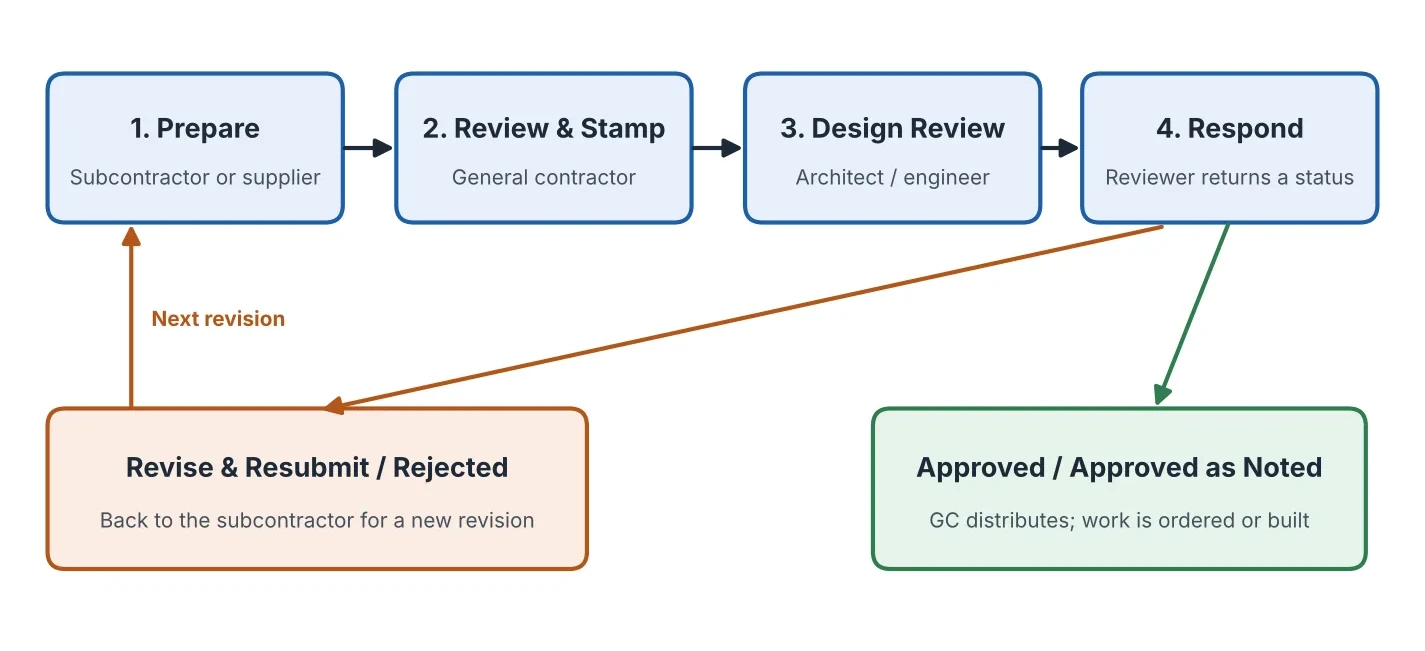
1. Prepare. The subcontractor or supplier puts together the submittal package, following what the specification section requires.
2. GC review. The general contractor checks the package for completeness and coordination, then stamps it and sends it to the architect or engineer, usually with a cover sheet or transmittal.
3. Design review. The architect or engineer reviews the submittal and marks it up.
4. Response. The submittal comes back with a status. The wording varies by firm, but the common ones are:
- Approved or No exceptions taken: proceed as submitted.
- Approved as noted or Make corrections noted: proceed, but follow the reviewer’s comments.
- Revise and resubmit: make the changes and send a new revision for review.
- Rejected: the submittal doesn’t meet the requirements and needs to be redone.
5. Distribute. The GC sends the reviewed submittal back to the subcontractor and anyone else who needs it, and work can be ordered, fabricated or installed.
A submittal that comes back as revise and resubmit starts the cycle again as a new revision. Some items take two or three rounds before they’re approved, which is why it’s important to keep every revision and comment together.
The Submittal Log
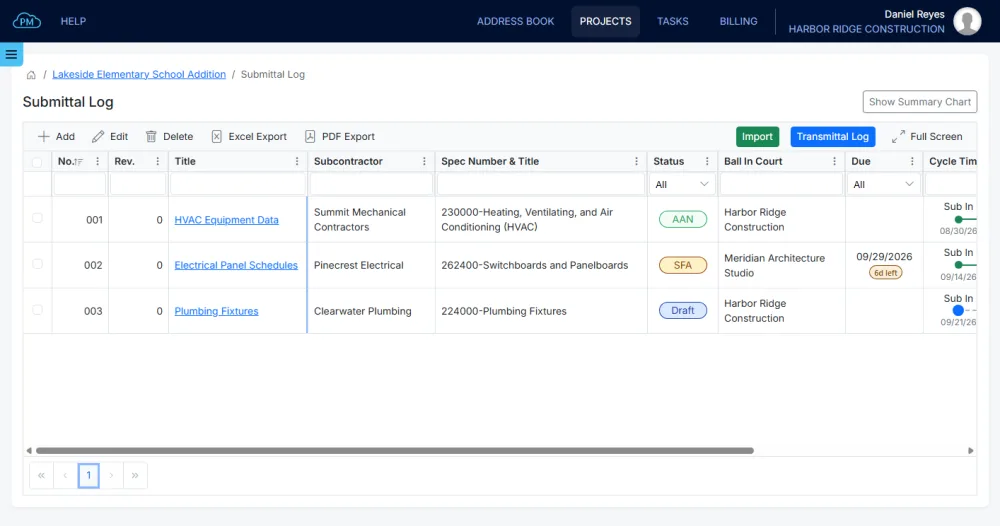
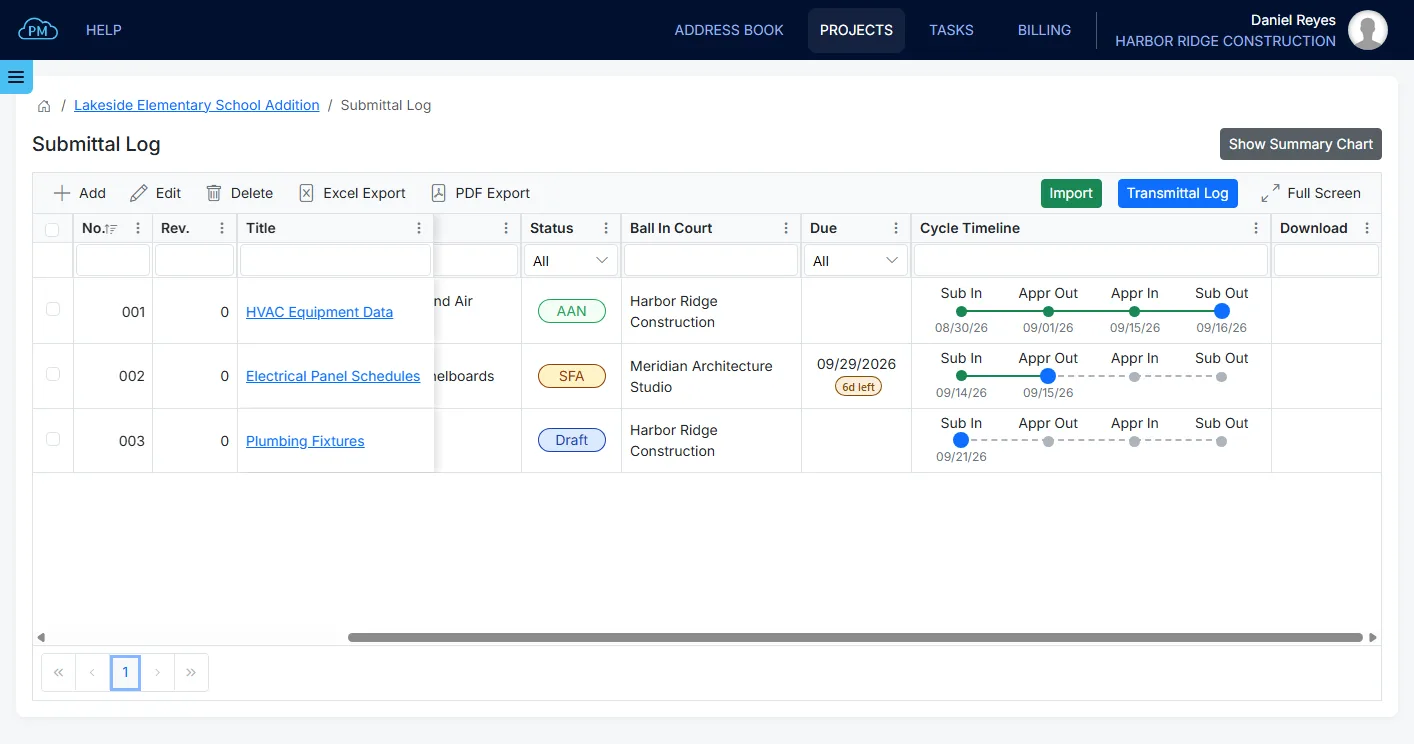
On a commercial project there can be hundreds of submittals moving at the same time. The submittal log, sometimes called the submittal register, is the list the general contractor uses to keep track of all of them.
A typical submittal log tracks:
- Submittal number and revision
- Specification section
- Description
- Subcontractor or supplier responsible
- Date sent and date due back
- Current status
- Who has it now, often called “ball in court”
Many teams still keep their log in a spreadsheet. It works on a small job, but it gets hard to keep current as revisions, emails and attachments pile up. That’s where construction submittal software helps: the log can update as submittals are created, sent and returned, and every file and revision stays attached to the submittal it belongs to.
Common Submittal Problems
Late submittals. If a submittal goes in late, the review, any resubmittal and the material lead time all push into the schedule. Building a submittal schedule early, starting with long-lead items, avoids most of this.
Incomplete packages. Missing data sheets, wrong product options or unchecked shop drawings often get sent back. A careful GC review before sending saves a full review cycle.
Lost revisions and comments. When submittals live in email threads, it’s easy to build from an old revision or miss a reviewer’s note. Keeping every revision and response in one place prevents that.
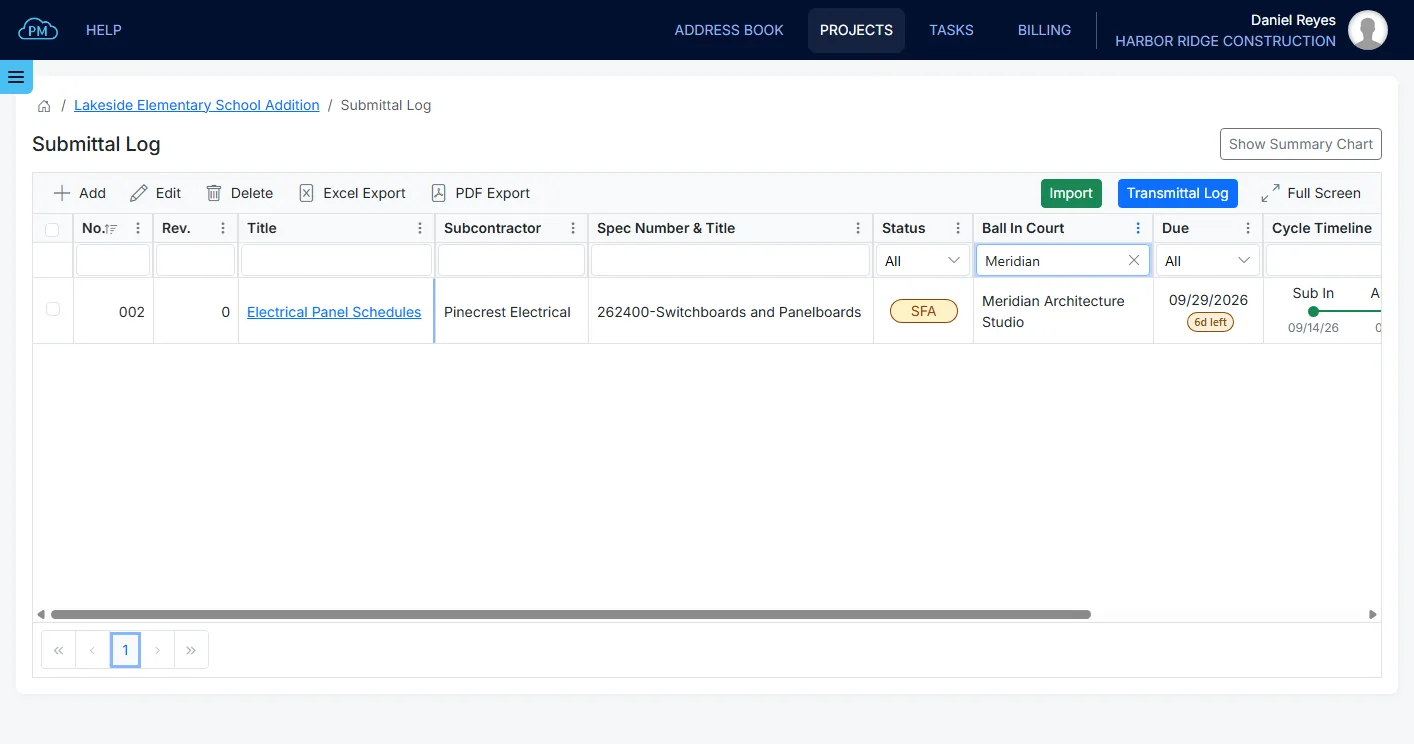
No clear owner. If nobody knows whose turn it is, submittals sit. Tracking who has each submittal and when it’s due keeps things moving.
Submittal FAQ
What is the difference between a submittal and an RFI?
A submittal shows the design team what the contractor plans to provide, so they can review and approve it. An RFI (request for information) asks the design team a question, usually because something in the drawings or specifications is unclear or conflicting. See how teams manage RFIs.
What is the difference between a submittal and a transmittal?
A transmittal is the cover document used to send items from one party to another, listing what’s being sent and why. A submittal is the item being reviewed. Submittals are often sent with a transmittal. Learn more about construction transmittals.
How long does submittal review take?
It depends on the project. The specifications usually set a review period, often around 10 to 14 days, and complex submittals or resubmittals can take longer. Check the submittal procedures section of your project’s specifications.
Who approves submittals?
The architect or engineer of record reviews and responds to submittals. The general contractor reviews and stamps them first, but the design team gives the final response.
What happens if work is installed without an approved submittal?
The contractor takes on the risk. If the installed item doesn’t meet the specifications, the contractor may have to remove and replace it at their own cost.
Keeping Submittals on Track
Submittals are one of the main ways a project team makes sure what gets built matches what was designed. Knowing the types, the review process and how to track them in a log makes the whole project run smoother.
If you’re managing submittals in spreadsheets and email, see how Cloud PM’s construction submittal software keeps your submittal log, files and revisions in one place.