
Construction document control is how a project team keeps its drawings, specifications and other documents organized, up to date and in the right hands. When it works, everyone builds from the current drawings. When it doesn’t, a crew builds from a drawing that was replaced two weeks ago, and the work has to be torn out and done again.
In this post we explain what document control is, which documents need it and how to set it up on a project, with a folder structure you can use. Then we show how project files work in Cloud PM.
What Is Document Control in Construction?
Document control is the process of managing a project’s documents from the time they are created or received until the project is closed out. It covers how documents are named and numbered, where they are saved, who can see and change them, how new versions replace old ones and who received each document and when.
Document management and document control are often used for the same thing, but there is a difference. Document management is about storing and organizing files so you can find them. Document control adds the rules: there is one current version of each document, the old versions are marked as superseded, and every document sent out is recorded.
Why Document Control Matters
- Everyone works from the current version. Drawings change many times on a project, through addenda, RFI answers and change orders. Without document control, the field can build from a superseded drawing, and the rework costs time and money.
- You have a record when there is a dispute. When the owner or a subcontractor questions what was sent or approved, you can show which version went to whom and when.
- Information is easy to find. The team spends less time looking for the latest specification or the photo of a wall before it was closed.
- Closeout is faster. At the end of the project, the as-built drawings, the approved submittals and the other closeout documents are already organized.
Which Documents Need to Be Controlled
On most projects, these documents need document control:
- Drawings and specifications, with every revision, addendum and bulletin.
- Submittals, such as shop drawings, product data and samples. Learn more about construction submittals.
- RFIs and their answers. Learn more about RFIs in construction.
- Change orders and the documents that support them. Learn more about change orders.
- Contracts and subcontracts, with the signed versions.
- Meeting minutes, daily reports and correspondence. See what to include in a construction daily report.
- Schedules, photos, permits and inspection reports.
How to Set Up Document Control on a Construction Project
Set up document control at the start of the project, before the first drawings are issued. Write the rules down in a short document control plan, so everyone on the team follows the same ones:
- Set up the folder structure. Create the same folders on every project, so the team always knows where to look. See the folder structure below.
- Decide how documents are named and numbered. Use the sheet number for drawings, such as A-101, and add the revision to the name or the number, so you can tell two versions apart.
- Keep one current set. When a revised drawing comes in, replace the old one in the current set and move the old one to a superseded or archive folder, so it can’t be used by mistake.
- Decide who can see and change each folder. Most people only need to view the documents. Give permission to upload or delete only to the people who manage them, and give other companies access only to the folders they need.
- Record every document you send. Send documents with a transmittal or from a system that records who received each one and when.
- Keep the records until closeout and after. Your contract and your insurance may require you to keep the project records for years after the project ends.
A Folder Structure for a Construction Project
A simple folder structure works better than a detailed one, because the team will actually use it. Here is a structure that works for most projects:
- Drawings, with a folder for the current set and one for superseded drawings.
- Specifications.
- Addenda.
- Correspondence and emails.
- Project photos, by date or by area.
- Work schedules.
- Billing files, such as pay applications and invoices.
- General documents, for anything that doesn’t fit the other folders.
Submittals, RFIs and change orders work best in their own logs, where each one has a number, a status and its revisions, rather than in folders.
Document Control in Cloud PM
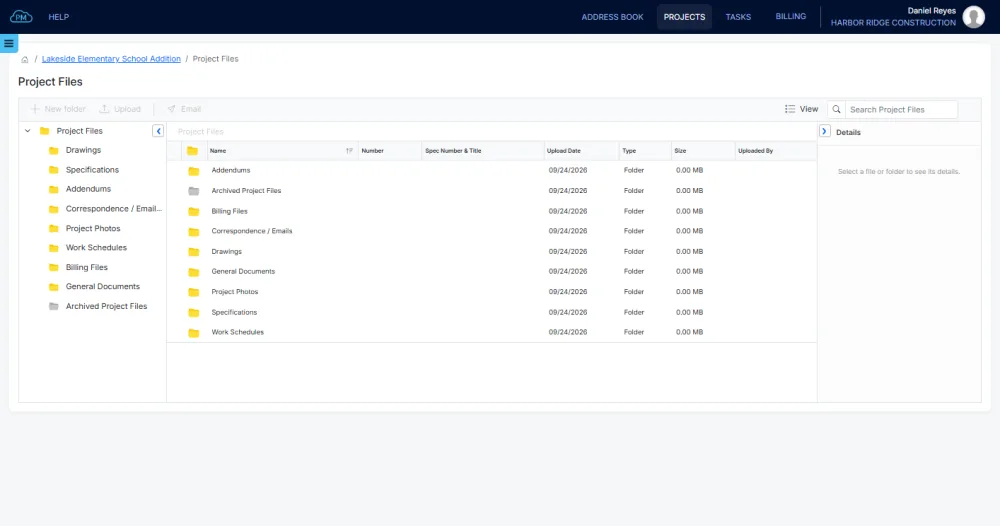
In Cloud PM, each project has its own File Manager, with standard folders for drawings, specifications, addendums, correspondence and project photos. You can add your own folders inside them, and you can see the folder tree and the files side by side.
You can drag files into a folder, and every file gets a name, a file number and a spec section. When you upload many files at once, you can give them all the same file number and spec section. You can search all the folders in a project at once, and the results show the folder where each file is saved.
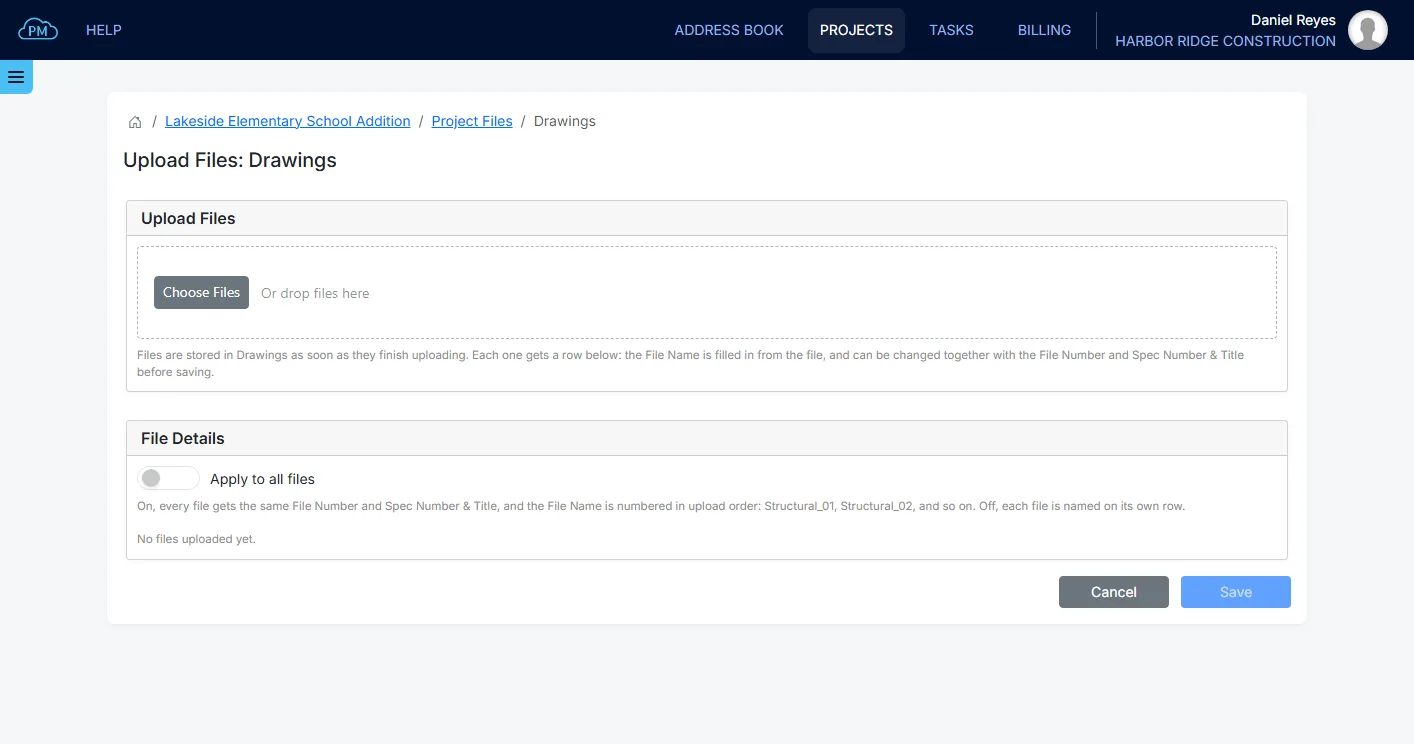
When you upload a revised drawing, it replaces the old file and keeps its name, file number and spec section, so the folder always has the current version. If you prefer to keep every version, you can upload the revised drawing as a new file, for example with “Rev B” in its name, and the earlier versions stay in the folder.
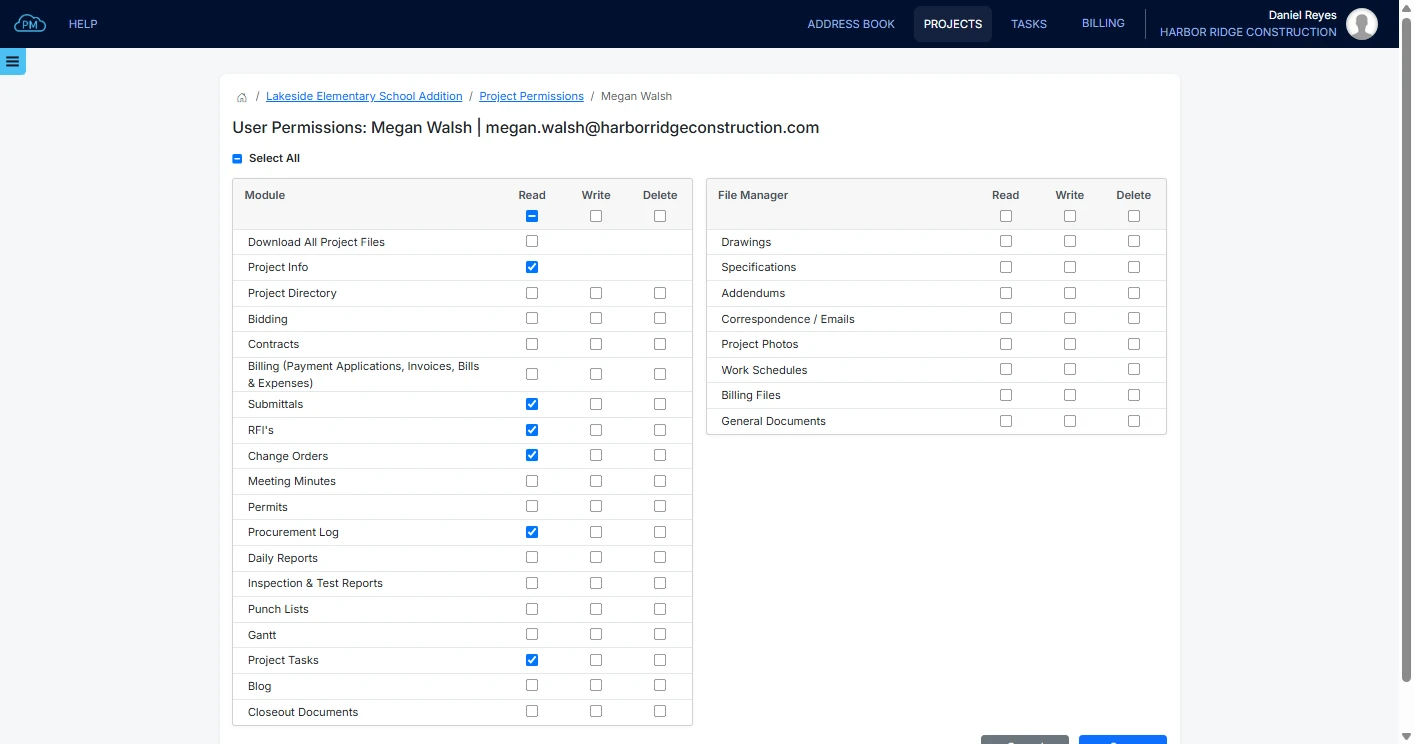
A Company Admin or the Project Admin sets the permissions for each user on each project, with Read, Write and Delete permission on each File Manager folder. You can give the other companies on the project access only to the folders they need.
You can email files directly from the project, without an attachment size limit, to recipients you select from the Project Directory. Cloud PM records who received each file and when, and the recipients don’t need a Cloud PM account to download the files.
Your files are saved in the same project as your submittals, RFIs and daily reports. The other companies on the project use Cloud PM free of charge, and plans start from $40 a month. Learn more about construction file sharing in Cloud PM.
Frequently Asked Questions
What is the difference between document management and document control?
Document management is storing and organizing files so you can find them. Document control adds the rules that keep the documents reliable: one current version of each document, the old versions marked as superseded, permissions on who can change them and a record of every document sent out.
What is a document control plan?
A document control plan is a short document that sets the rules for a project: the folder structure, how documents are named and numbered, how revisions are handled, who can see and change each folder and how documents are sent and recorded. Some owners and contracts require one at the start of the project.
Who is responsible for document control on a construction project?
On large projects, a document controller manages the documents full time. On smaller projects, the project engineer or the project manager usually does it. Either way, everyone on the team follows the same rules for saving and sending documents.
How do you keep track of drawing revisions?
Give each revision a number or a letter on the drawing and in its file name, keep only the current revision in the current set and move the old ones to a superseded folder. When a revision is issued, send it with a transmittal so you have a record of who received it.