
The construction bidding process is how a general contractor gets prices from subcontractors and suppliers for each part of a project and chooses the company that will do the work. When the bidding is organized, every company prices the same scope, and you can compare the proposals and award the work on time.
In this post we explain the steps of the bidding process, what an invitation to bid should include and how to compare subcontractor bids. Then we show how bidding works in Cloud PM.
What Is the Construction Bidding Process?
Bidding happens twice on most projects. First, the owner asks general contractors to bid on the whole project, or chooses one and negotiates the price. Then the general contractor asks subcontractors and suppliers to bid on each part of the work: the concrete, the structural steel, the drywall, the plumbing.
This post is about the second part, the bidding a general contractor runs. The general contractor’s own price to the owner depends on it, and so does the price of every subcontract it signs.
There are two common ways to bid, and both start with an invitation to bid. For an open, or competitive, bid, the owner or contractor publishes the invitation, for example as a public notice or on a bid website, and any qualified company can submit a price. For an invited bid, the contractor sends the invitation only to the companies it chooses.
The Steps of the Bidding Process
- Split the work into bid items. Each bid item is one material or service with its own scope of work, such as the structural steel or the drywall installation, so every company prices the same thing.
- Make the bid list. Choose the subcontractors and suppliers to invite for each bid item. Invite enough companies that you still have a choice when some of them don’t reply.
- Send the invitations to bid. Each invitation has the scope of work, the drawings and specifications, and the date the proposal is due.
- Answer the bidders’ questions. When a bidder asks a question, send the answer to every bidder on that bid item, so they all price the same scope. Changes to the bid documents go out as addenda.
- Collect the proposals by the due date. Follow up with the companies that haven’t replied while there is still time to invite someone else.
- Compare the proposals. Check that each one covers the same scope, then compare the prices.
- Choose the company and award the work. The company you choose gets the subcontract or purchase order, and the materials it supplies go on the procurement log. Let the other bidders know the result.
What an Invitation to Bid Should Include
An invitation to bid tells a subcontractor or supplier what you want priced and by when. A clear invitation gets you proposals you can compare. It should include:
- The project name and location.
- The bid item and its scope of work, including what is not part of it.
- The specification section that covers the work.
- The drawings and documents the bidder needs to prepare a price.
- The proposal due date.
- Who to contact with questions, and how to submit the proposal.
Ask each company to confirm whether it will bid. When a company declines early, you have time to invite another one.
How to Compare Subcontractor Bids
You compare subcontractor bids by checking that they cover the same work and then comparing the prices. The lowest number isn’t always the lowest price: a proposal that leaves out part of the scope costs more once you add that part back.
- Compare the same scope. Read what each proposal includes and leaves out, such as equipment, permits, cleanup or taxes.
- Compare the latest prices. Put each company’s latest price next to the others, not an early price next to a revised one.
- Compare against your estimate. A proposal far above or below your estimate usually means a difference in scope or a mistake.
- Keep every revised price. Subcontractors often lower their price after questions or in a second round, and you may need to show how the number changed.
The table that lists the prices side by side is called a bid tab, short for bid tabulation. Here is one for the drywall installation on a school addition, with an estimate of $250,000. The companies and prices are an example:
| Company | Proposal #1 | Proposal #2 | Final Proposal | Scope |
|---|---|---|---|---|
| Company A | $262,000 | $248,500 | $245,000 | Full scope |
| Company B | $239,000 | None | None | Leaves out the ceilings |
| Company C | $255,000 | $251,000 | $249,000 | Full scope |
Company B has the lowest number, but it leaves out the ceilings, so its price isn’t comparable until it adds them. Company A and Company C both lowered their price in the later rounds. For the same scope, Company A has the lowest final price, below the estimate.
Managing Bids in Cloud PM
In Cloud PM, bidding is part of each project. Each material or service you put out for bid is a bid item in the Invitation to Bid Log, with its specification section and the proposal due date. When you enter the estimated quantity and unit price, Cloud PM calculates the estimated value, so you can compare each proposal against it.
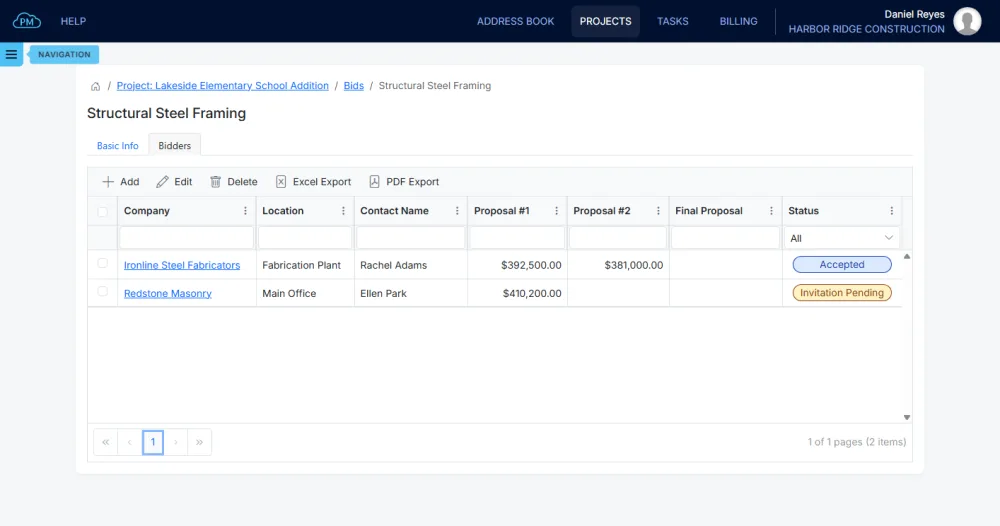
When you invite bidders, you select the company, the office and the contact from your Address Book. The contact receives an email with the scope of work and the proposal due date, and can accept or reject the invitation from the email. Once a company accepts, it can open the project files in Shared Files. The response rate on each bid item shows how many of the invited companies have replied, so you know in time to invite another company.
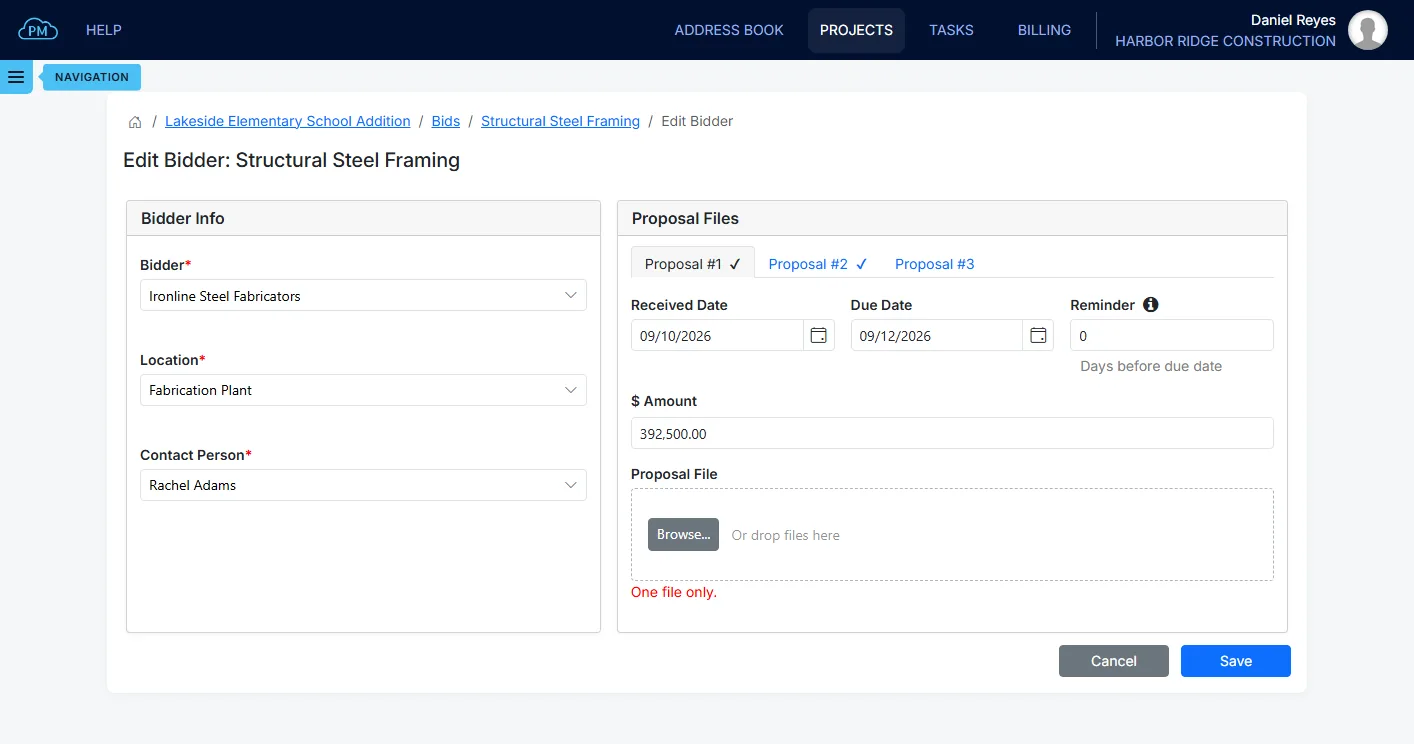
Every bidder has three proposal rounds, each with its own amount, proposal file and dates, and Cloud PM sends a reminder before the due date. An invited company can log in, enter its proposal amount and upload the proposal file, and it sees only its own row, never another company’s price. Cloud PM saves each round separately, so a revised price never replaces an earlier one.
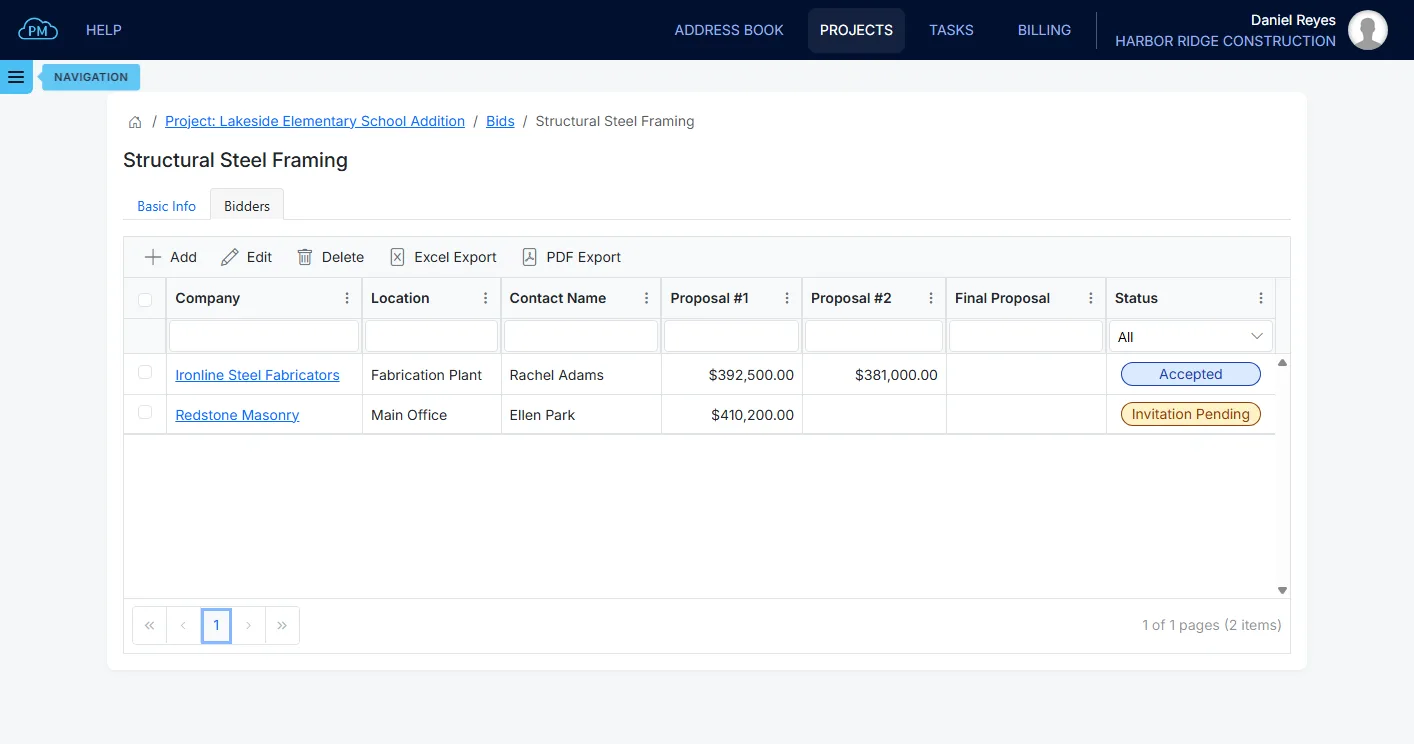
When you expand a bid item in the log, you can compare every company’s Proposal #1, Proposal #2 and Final Proposal side by side, and see who changed their price, by how much, and which company has the lowest price. You can export the list to Excel or PDF. When the bidding is over, you can close the bid item, and Cloud PM withdraws the open invitations and keeps every proposal.
Subcontractors and suppliers bid with free accounts as outside users, and plans start from $40 a month. Learn more about Cloud PM bid management.
Frequently Asked Questions
What is a bid tab in construction?
A bid tab, short for bid tabulation, is a table that lists the prices of every company that bid on the same work side by side. General contractors use it to compare subcontractor bids, and public owners publish one after a bid opening to show every bidder’s price.
What is the difference between an open bid and an invited bid?
For an open bid, the invitation to bid is public, and any qualified company can submit a price. For an invited bid, the contractor or the owner sends the invitation only to the companies it chooses. Public projects usually use open bids, and private projects often use invited bids.
What is a bid list?
A bid list is the list of subcontractors and suppliers a contractor invites to bid on each part of the work. It usually includes companies the contractor has worked with before and companies with the right license and experience for the job.
Why do subcontractors revise their bids?
Subcontractors revise their bids when the scope changes, when an addendum or the answer to a question changes what they have to price, or when the contractor asks for a better price in a later round. Keep every revised price, so you can show how you reached the final number.