
Bid Management Software
Cloud PM's bid management software helps general contractors invite subcontractors and suppliers to bid, collect their proposals and choose the right company for each part of the work. Bidders submit their proposals free of charge, and you can compare them side by side and keep track of every due date.
The Invitation to Bid Log
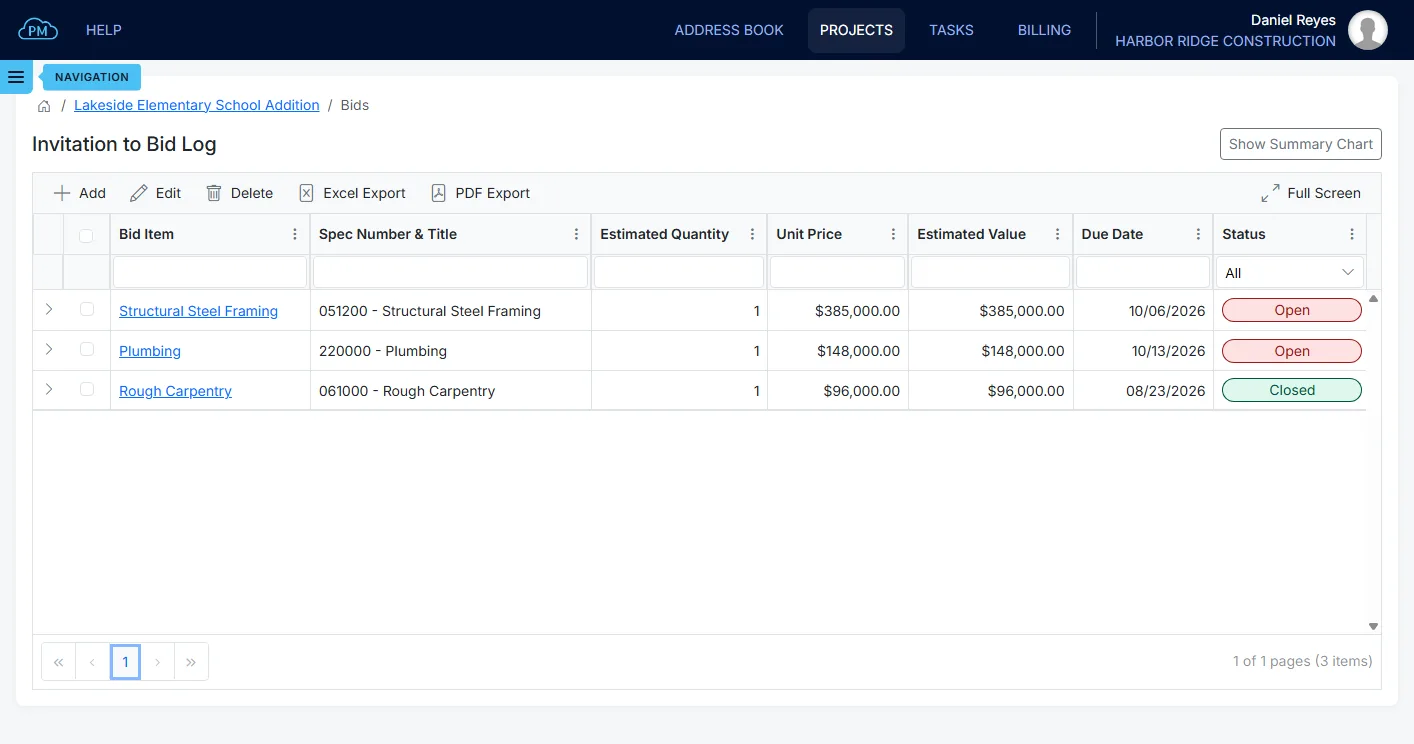
Each material or service on the project is a bid item in the Invitation to Bid Log, with its specification section and the proposal due date. Cloud PM also calculates the estimated value from your quantity and unit price, so you can compare each proposal against it. Each bid item is marked Open or Closed, so you can see which bid items are still open for bids.
-
Quick Filtering
You can search any column, sort by any heading, and filter the log by open or closed bid items.
-
Due Date Tracking
Every proposal round has its own due date, and Cloud PM sends the bidder a reminder before the due date.
-
Instant File Access
Each proposal is saved with its file, so you can download it directly from the bidder's row.
Invitation Status and Response Rate
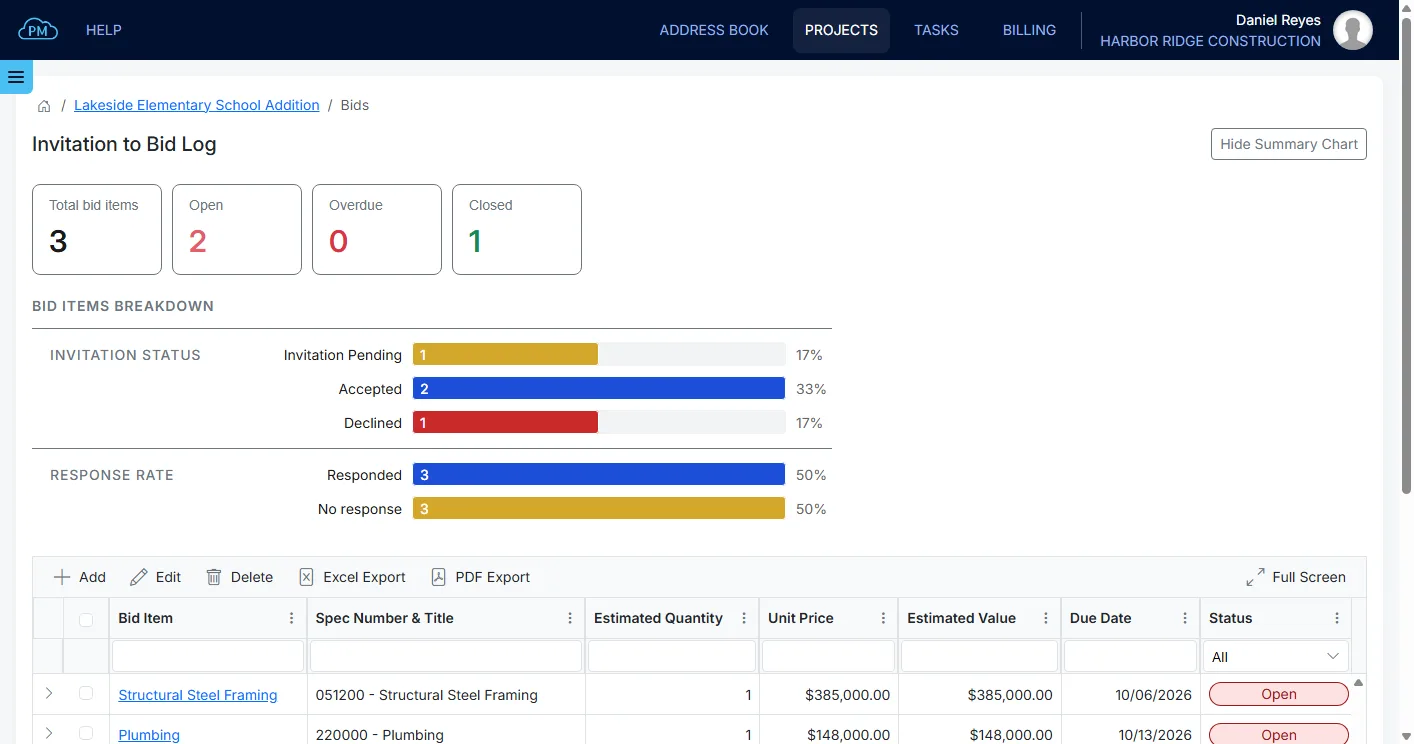
Cloud PM shows how many of your bid items are open and how many are overdue. You can also see your invitations by status, from pending to accepted or declined. While a bid item is open, the response rate shows how many of the invited companies have replied.
Compare the Proposals Side by Side
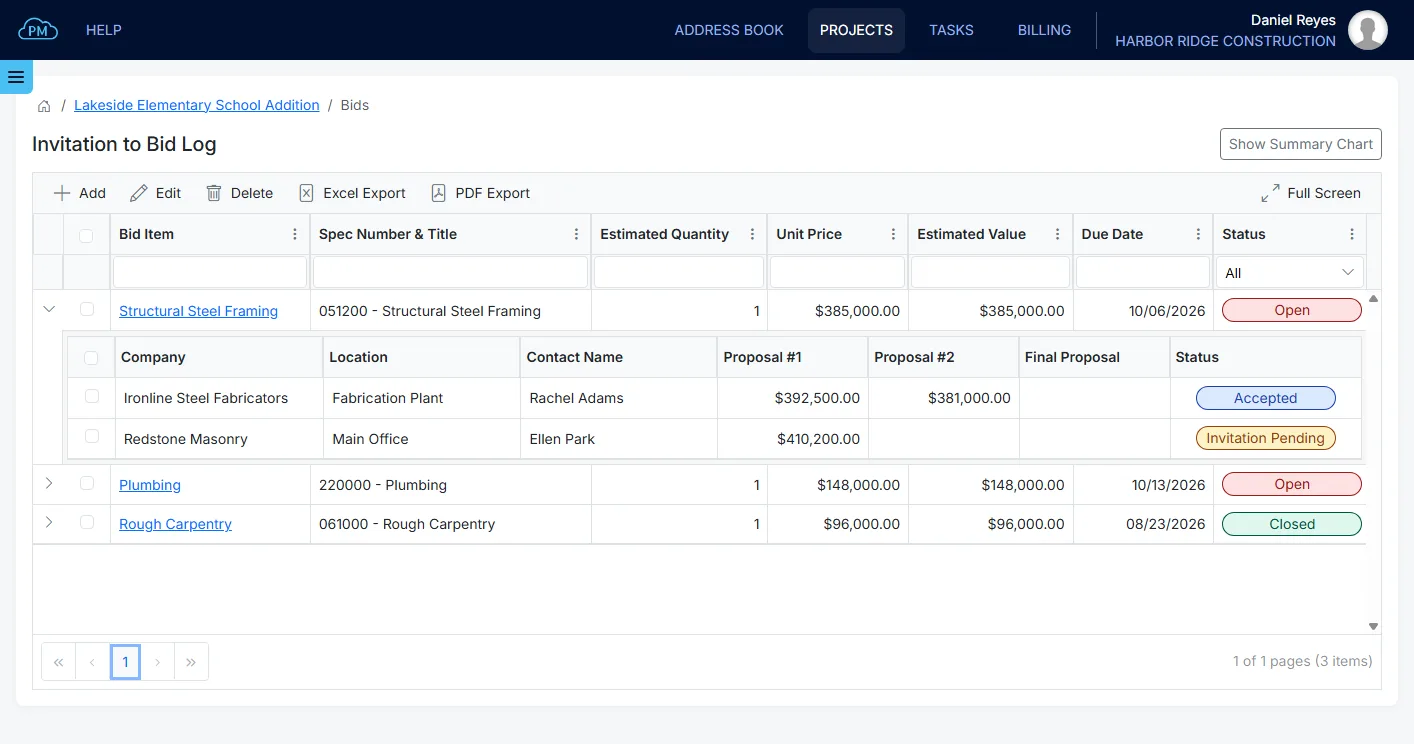
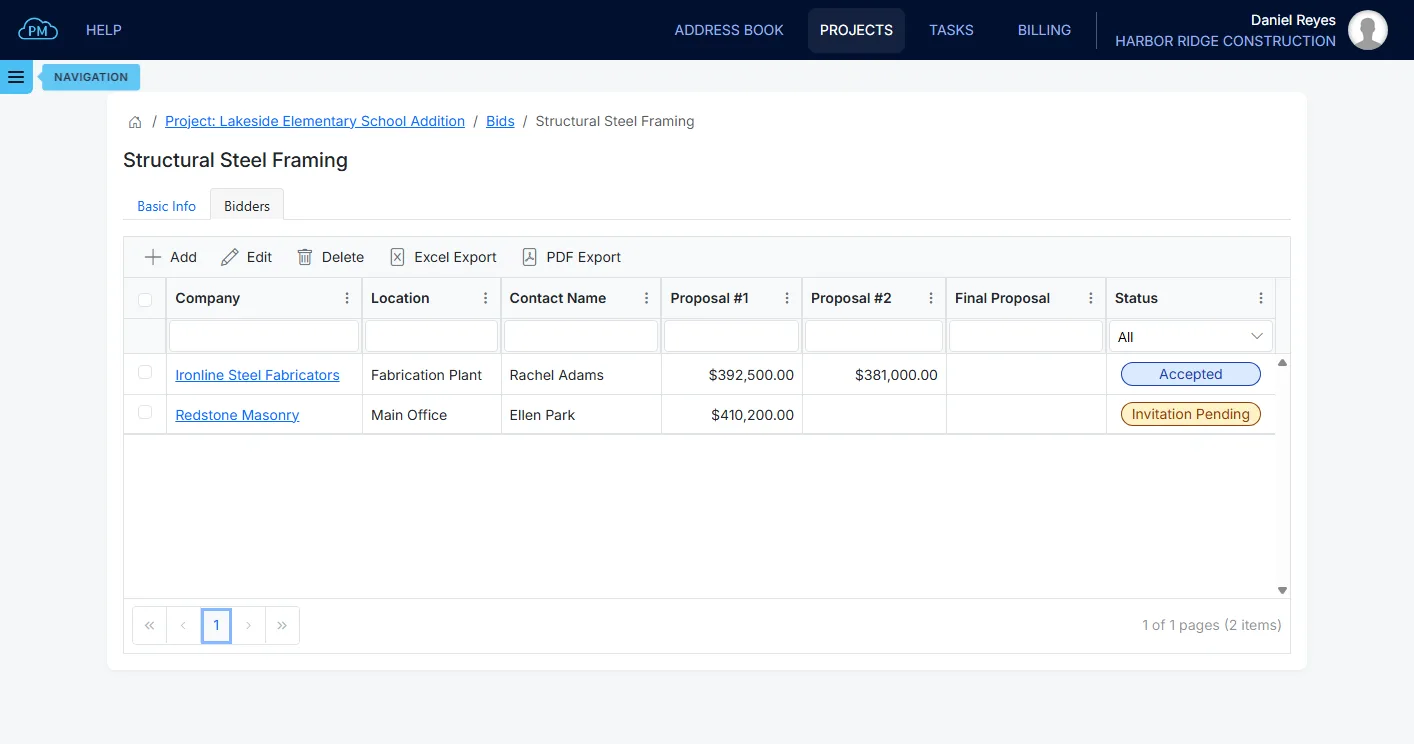
You can expand each bid item in the log to see its bidders and compare every company's Proposal #1, Proposal #2 and Final Proposal amounts side by side. You can see who changed their price, by how much, and which company has the lowest price. You can also export the list to Excel or PDF.
From Invitation to Proposal
Bidding in Cloud PM has three steps. You describe the scope, invite the companies to bid, and their proposals are added to the bid item for each round.
Describe the Bid Scope
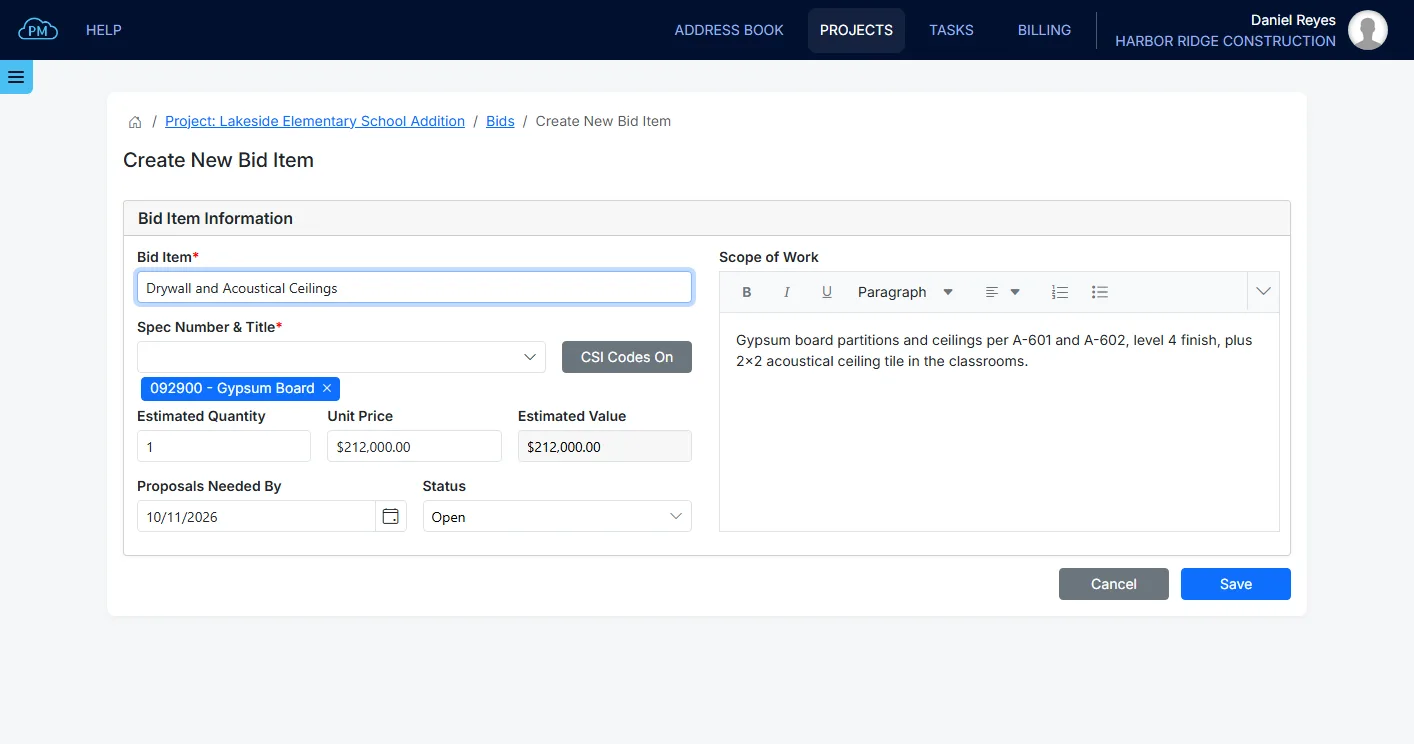
A bid item is a material or service, such as the structural steel or the drywall installation. You enter its name and scope of work for the bidders, and you search the MasterFormat list and select its specification section. If you use your own numbering, you can disable the CSI codes and enter your own section number. When you enter the estimated quantity and unit price, Cloud PM calculates the estimated value to compare against the proposals.
Invite the Companies to Bid
You can select bidders from your Address Book, so a subcontractor you have worked with before is already there. You select the company, the office and the contact who receives the invitation. When you invite them, the contact receives an email with the scope of work and the proposal due date. They can accept or reject the invitation from the email, and their answer is shown on the bid item as the invitation status. If a bid item does not have enough bidders, you can see it in time to invite another company. Once a company accepts, it can open the project files in Shared Files.
Three Proposal Rounds for Every Bidder
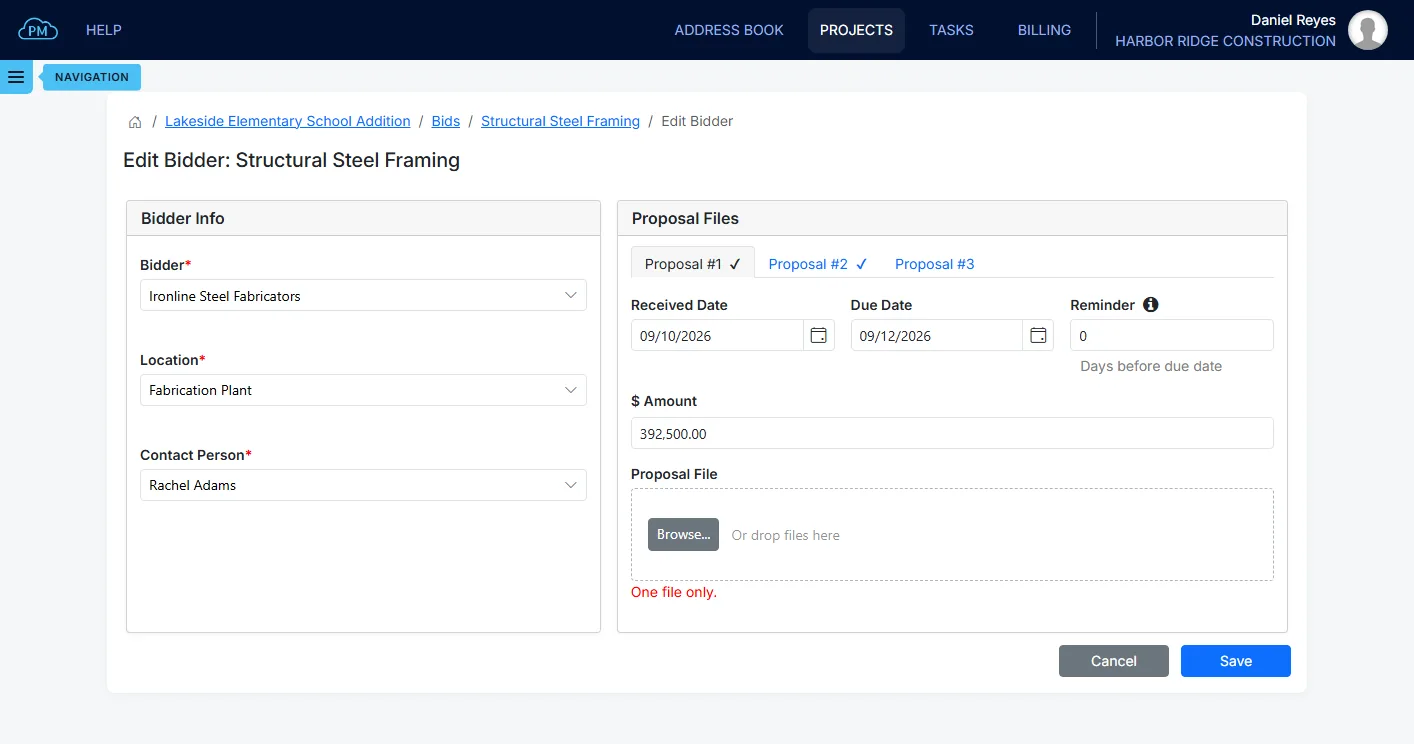
Bidders often revise their price, so every bidder has three proposal rounds. Each round has its own amount, proposal file, request date and received date, and Cloud PM sends a reminder before the due date. Each round is saved separately, so a later price never replaces an earlier one. When the bidding is over, you can close the bid item, and Cloud PM withdraws the open invitations and keeps every proposal.
Why Choose Cloud PM for Bid Management
On bid day you need numbers you can trust, so Cloud PM keeps each bid item, its bidders and all their proposal rounds together. You can support every number in the comparison. The subcontractors and suppliers have free accounts as outside users, and plans start from $40 a month.
-
Every Round, Side by Side
Cloud PM keeps each company's proposal with its file, so you know where every amount came from. You can compare all three rounds side by side and see exactly what changed. You can export the log to Excel or PDF when an owner, an estimator or an auditor asks how you reached the number.
-
Bidders Upload Proposals
An invited company can log in, enter its proposal amount and upload the proposal file, so nobody on your team has to retype the prices. Each bidder sees only its own row on the bid item, never another company's amount, and has a free account as an outside user.
-
Reminders and Response Rates
Every round has a due date, and Cloud PM sends a reminder before it. You can see the response rate on each bid item, so you know which invitations are still pending and which companies have not replied. You find out in time to invite another company before bid day.
Construction Bid Management FAQ
Bid management software is what a contractor uses to manage the bidding on a project. It keeps the materials and services out for bid, the companies invited to bid on each one, their proposals and the comparison between them. It replaces the spreadsheets and email folders that many contractors still use.
An invitation to bid is the request a contractor sends a subcontractor or supplier asking for a price on a material or service. It includes the scope of work, the specification section and the proposal due date. In Cloud PM, the invitation is sent by email, and the company can accept or reject it.
You compare them for the same material or service, in the same units and at the same proposal round. Cloud PM lists every bidder under its bid item, with the Proposal #1, Proposal #2 and Final Proposal amounts in separate columns. You can also compare them with your estimated value.
No. A company you invite has a free account as an outside user. It can log in, see only the bid item it was invited to, and upload its proposal on its own row.